FastPix for corporate L&D
Video API for corporate training
FastPix Video API has everything you need to run corporate training video. Secure playback, transcripts, live sessions that record themselves, and completion data your LMS can read.
Per minute, with no per-learner and no per-seat fee. $25 in signup credits, no credit card.
Trusted by teams shipping video at scale





Why FastPix
Complete video infrastructure for corporate training
One API, whole stack
Upload, encoding, playback, live, AI and data all come from the same API key.
Secure by default
Every video sits behind a signed link your app mints, so a forwarded URL stops working.
Built for scale
Multi-CDN delivery scales with headcount, so a company-wide rollout runs on the same setup.
Analytics built in
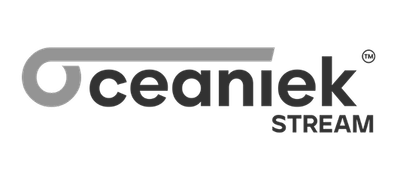
Every session reports watch time and playback quality, with no separate analytics product to buy.
Developer reference
Every endpoint a corporate training platform uses
Everything on this page maps to a documented call, grouped the way an internal learning platform gets built.
Upload and library
Encode and deliver
Access and DRM
Player and access
Transcripts and AI
Customer story
Having more of the infrastructure and features we needed, including the in-built deep analytics and web and mobile player, in one place, as opposed to say AWS or Kaltura, reduced the complexity for us.
Prabhakar P
Head of Digital, Knovo

Upload and library
Video upload API and library management for training
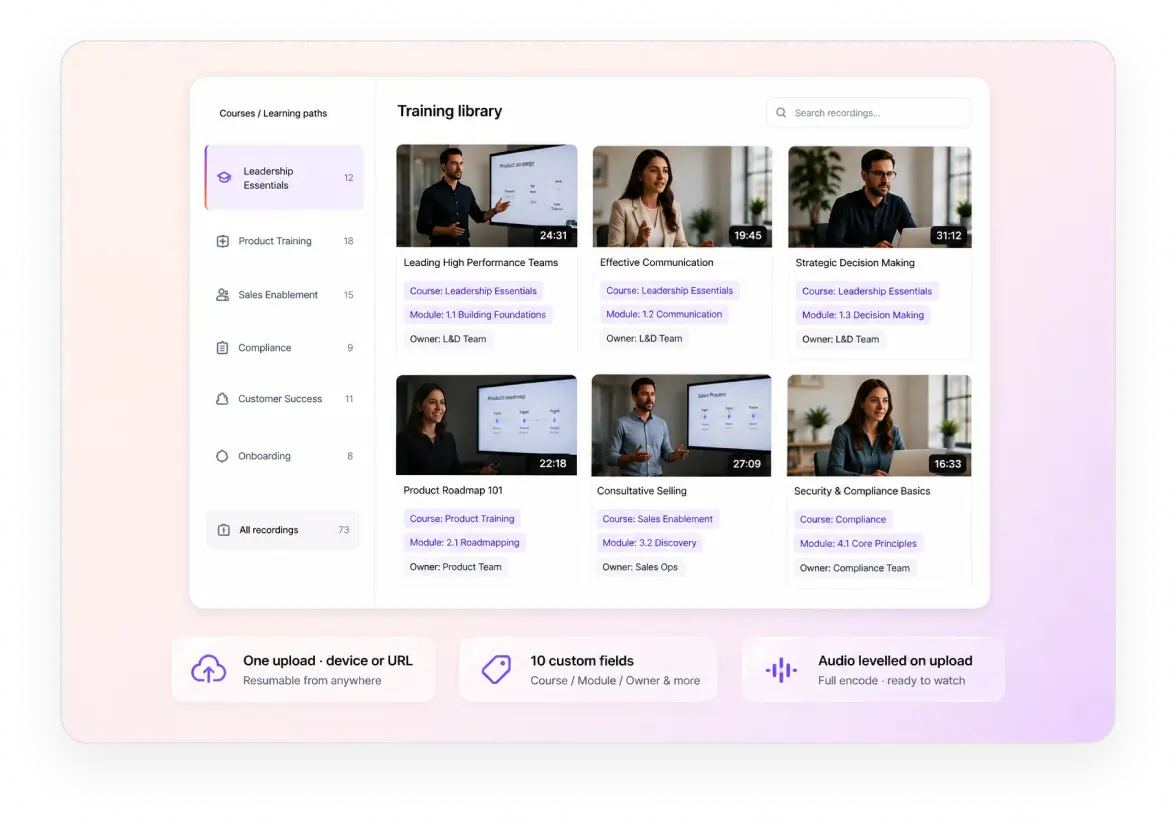
Every recording goes in through one upload call, from a device or a URL. Resumable transfers, a full encode, audio levelled to one volume, and ten custom fields carrying course, module and owner.
Resumable uploads from a device or a URL, so a large recorded session keeps moving on any connection. Guide
Per-title encoding into a full ladder, packaged as HLS and served from 300 locations worldwide. Guide
Ten custom fields per asset: course, module, department, owner and review date. Guide
Audio levelled on upload, so a quiet screen recording and a loud town hall play at the same volume. Guide
Enterprise security
Signed playback, DRM and download control for internal video
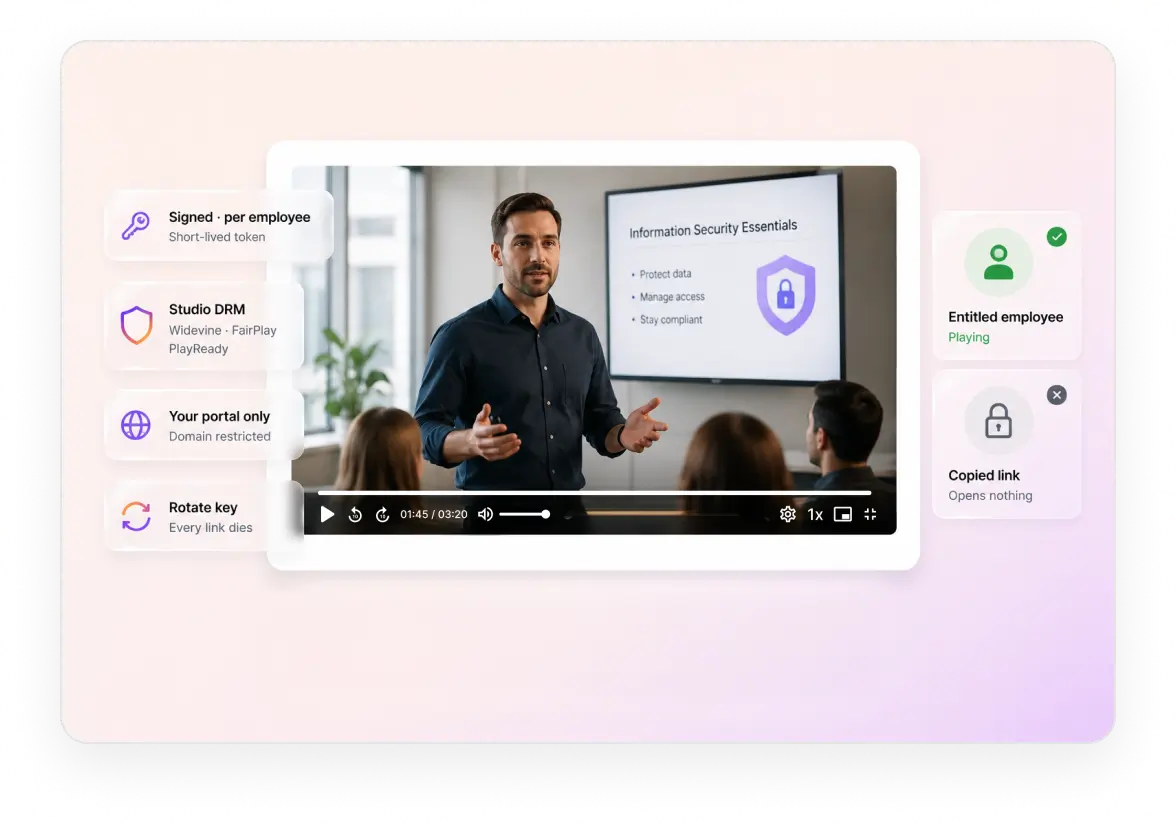
Playback is gated by default, so a copied URL opens nothing. Signed tokens minted per employee, DRM where the content warrants it, domain restrictions, and a signing key you can rotate.
Signed playback URLs on an RSA key pair, short-lived by default and minted per employee. Guide
Studio DRM where the content warrants it, Widevine, FairPlay and PlayReady on top of the signed link. Guide
Domain restriction and browser rules, so a recording plays on your portal and nowhere else. Guide
Rotate the key and every outstanding link dies, which is the answer when a leak is suspected. Guide
Video player
Video player SDKs with speed, chapters and captions
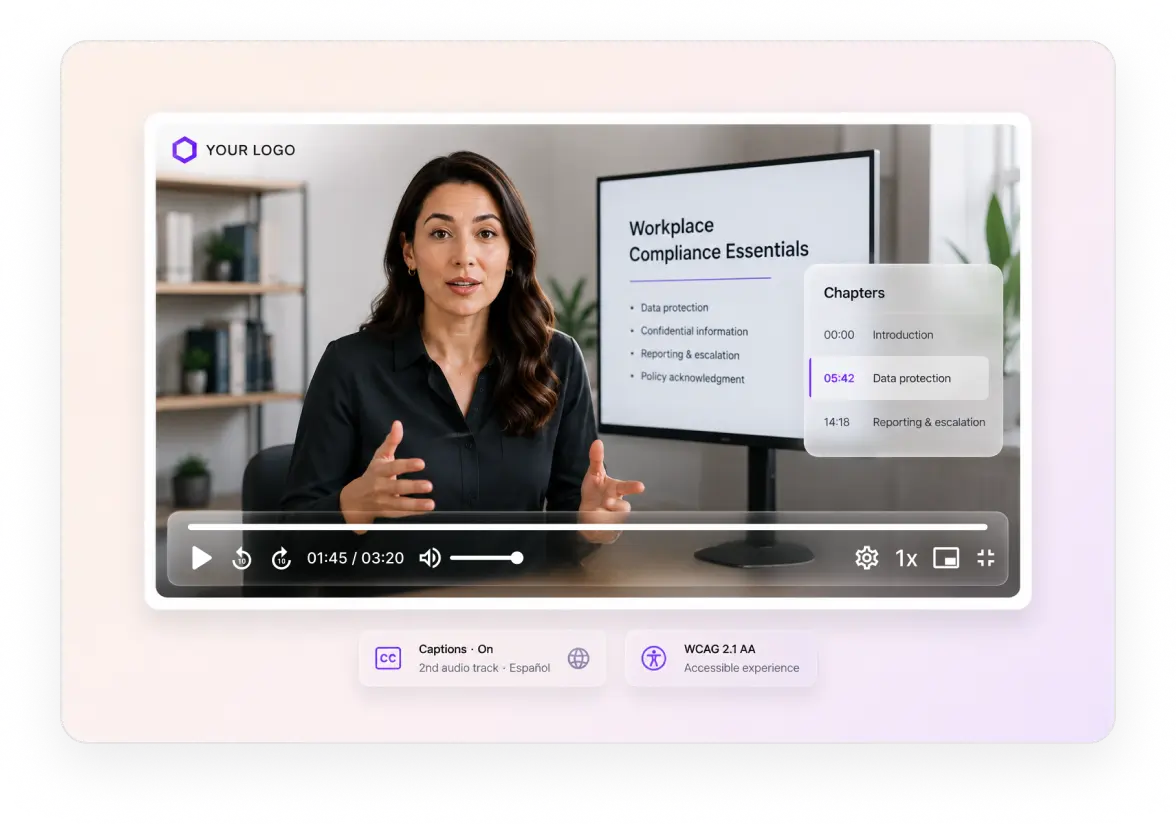
The player ships with the controls a long module needs. Playback speeds you choose, a start point your LMS sets, chapters, captions, multiple audio tracks, and keyboard access throughout.
Playback speeds you choose the options for, because most training is watched faster than real time. Guide
Start at a timestamp, so your LMS stores the last position and drops them back into it. Guide
Chapters, captions and multiple audio tracks, so one recording serves every region. Guide
Keyboard shortcuts and WCAG 2.1 AA, which is a legal obligation for employee training rather than a nice touch. Guide
In-video AI
Video transcription, chapters and search inside training video
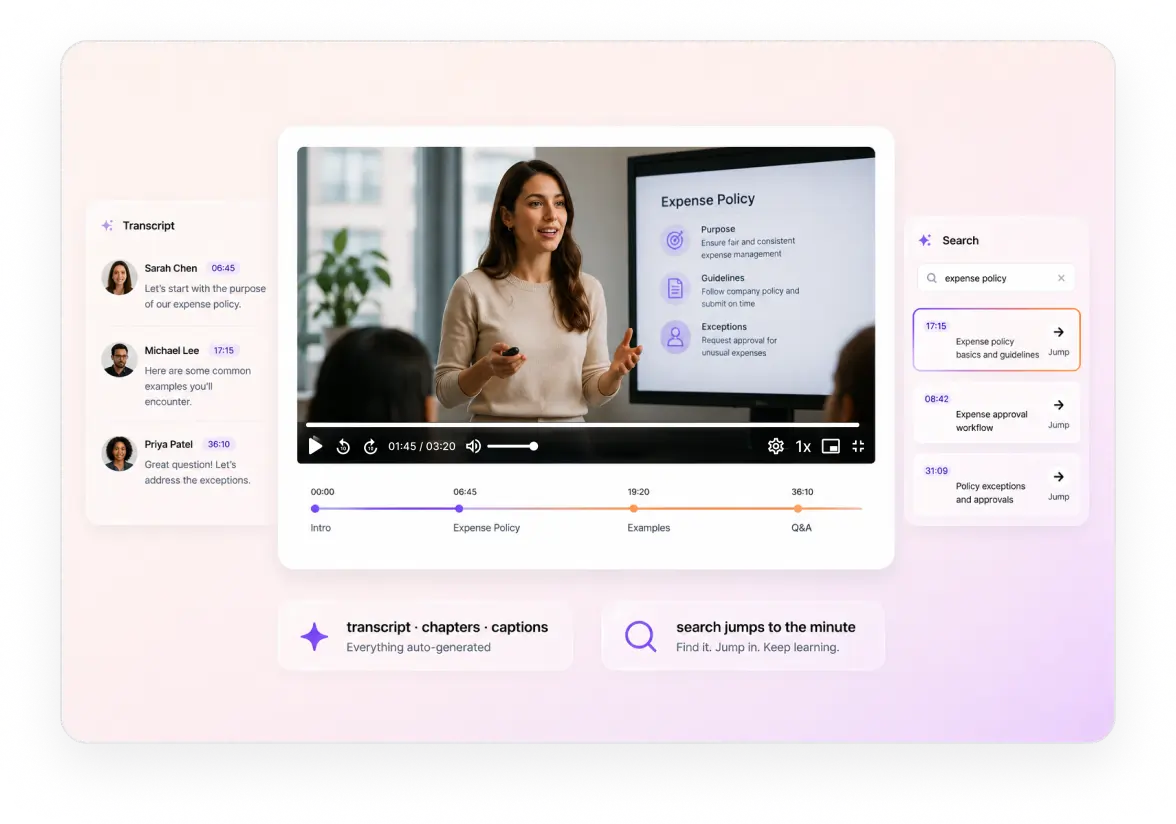
Every recording comes back with text under it. A timestamped transcript naming who spoke, chapters marking each section, and enough structure for a search to land on the right minute.
Chapters generated on the recording, so a long session gets a contents list nobody had to write. Guide
Summaries short enough for a catalog view, and an advanced summary for a long session. Guide
Captions in the language spoken, covering the accessibility obligation on employee training. Guide
Named entities pulled from speech, so a policy, product or system mentioned in a session reaches your index. Guide
Live training
Live training sessions that record themselves
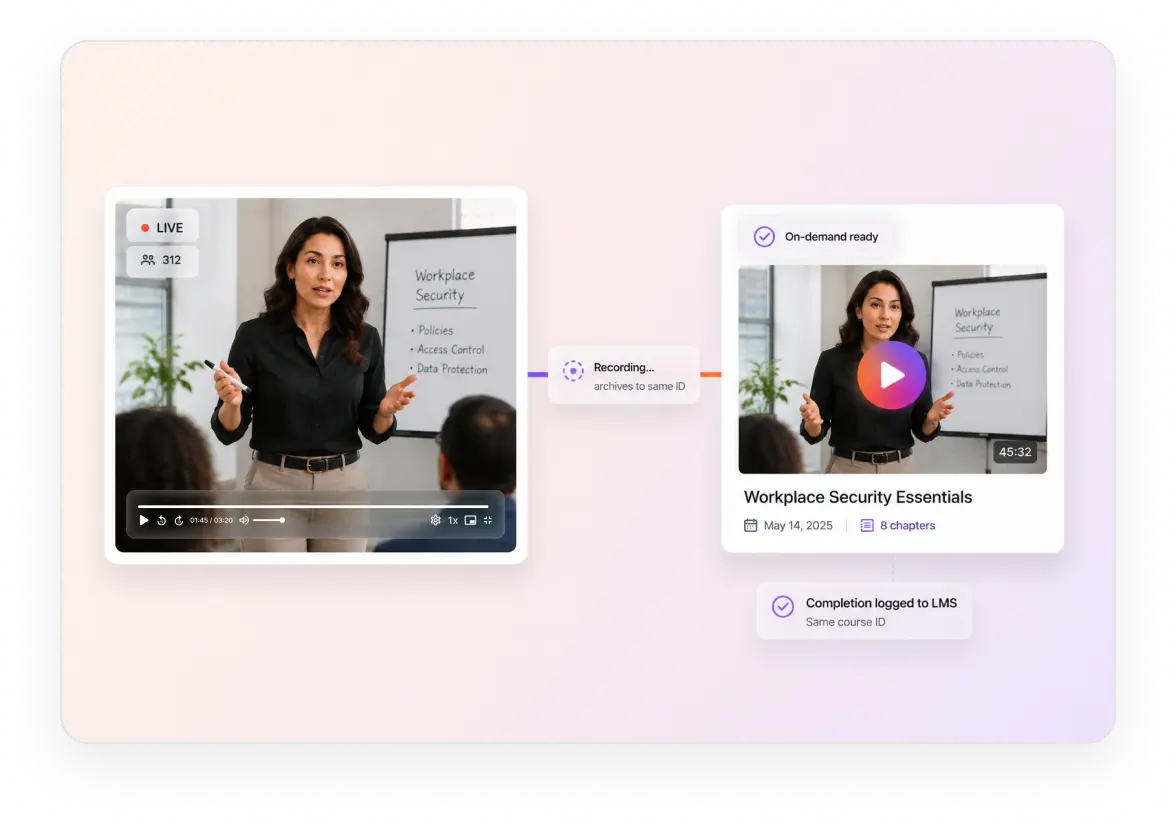
A live session becomes an on-demand course without anyone publishing it. Stream over RTMPS or SRT, or add the agent to the calendar invite, and the recording arrives by webhook.
RTMP, RTMPS and SRT ingest from a studio encoder, OBS or a laptop, transcoded as it arrives. Guide
Private live streams behind the same signed links, so an internal broadcast stays internal. Guide
DVR and rewind while the session runs, for anyone who joined a timezone late. Guide
Or add the Notes Agent to the calendar invite, and it joins Teams, Zoom or Meet and records unattended. Guide
Video data
Learner, course and playback analytics for training video
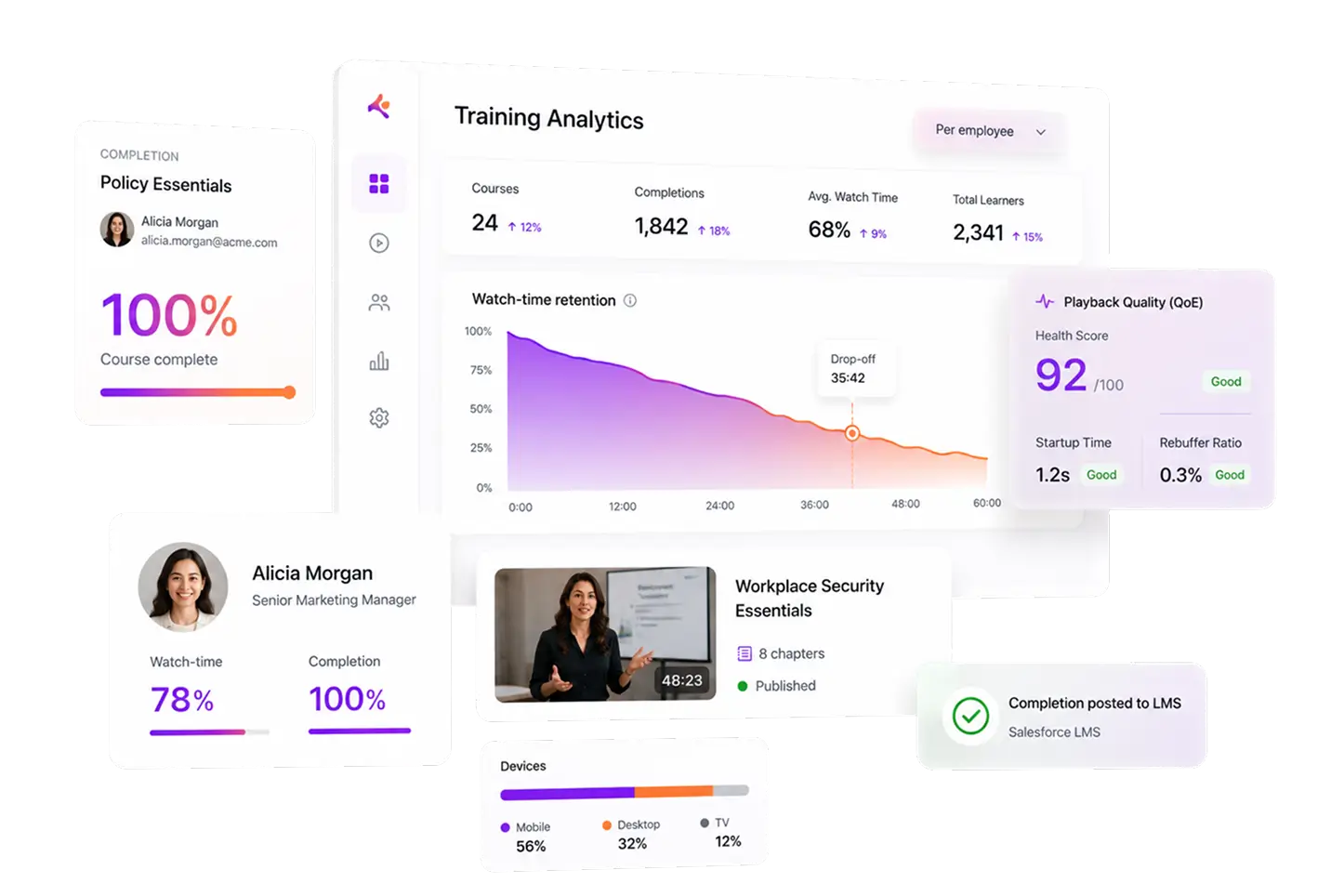
Every session reports three things at once: what one employee did, how a course performed across the company, and whether playback got in the way of either.
Learner-level data
What one employee did with a module, which is the record a compliance audit asks for.
Completion per session, so a mandatory module reports who finished rather than who opened it. Guide
Where they stopped, pointing at the section people give up on.
Repeat views, usually somebody checking a procedure again before doing it.
Course-level data
How a course performs across the whole company, so the next revision has something behind it.
Average watch time per module, across everyone rather than one cohort. Guide
The drop-off curve, marking where a 45 minute session loses the room.
Ten custom dimensions, so department, region and cohort become filters.
Playback quality
Whether the video worked, kept separate from whether the training was any good.
Startup time and rebuffering, because a stall reads as the training platform being broken. Guide
Playback failures by device, so you find the locked-down corporate browser first.
Network and region breakdowns, showing which offices sit furthest from good delivery.
56 dimensions on every session, first 100,000 session plays a month included, and every event is available through the API for your own warehouse. Completion is evidence, not a dashboard. Tag uploads with the employee and course identifiers your HRIS and LMS already use, and the audit trail assembles itself where the rest of your compliance records live.
Integrations
LMS, SSO and warehouse integrations for L&D
The video layer reports into the systems you already run. Moodle plugins, completion into your LMS through SCORM and xAPI, playback tokens after your SSO check, and webhooks into the warehouse.
Moodle
Four plugins covering upload, embedding, activity and the editor, with watch-based completion and gradebook writeback.
SCORM, xAPI and LTI
Completion reaches your LMS the way it already expects it, so video sits inside the course rather than beside it.
SSO and identity
Your SAML or OIDC provider authenticates, your app checks entitlement, then it mints the playback token.
Webhooks and warehouse
Every media, AI and playback event is a webhook or an API call, so the data lands where your reporting already lives.
API and SDKs
Video API and SDKs for a training platform
Every step above is one documented call. SDKs in seven server languages, five client platforms, and webhooks for the steps that take time, so video does not become a project.
SERVER SDKS
CLIENT SDKS
Read the API referenceBenchmarked against five video APIs
A 21-minute session, measured against five video APIs
The file shape a training team ships every week: 467 MB of 1080p, 21 minutes and 31 seconds. Same file, same region, same network, through five platforms. The harness is open source.
Gumlet timed out on this file. A course team uploads in batches, so ninety seconds per session becomes an afternoon across a term of content.
At 1.81 seconds it reads as the video loading. At 3.46 it reads as your training platform being slow, and a learner opens the same module several times a week.
Encoding on the same file: FastPix 10.7s against 14.3s, 16.5s and 87.4s. Per-title encoding also produced 35% smaller files at matched quality, which is where a large library's storage bill comes off.
How it comes together
What it takes to run training video inside your LMS
Five steps between a recorded session and an employee finishing a module you can prove they watched.
Get the session in
Upload the recording from a device or a URL, and let the audio level itself on the way through.
GuideTag it to the course
Write course, module and department into custom fields, and keep the media ID beside them in the LMS.
GuideLet the AI do the reading
Captions, chapters and a timestamped transcript come back by webhook, ready for your search index.
GuideGate the playback
Your identity provider says who they are, your app mints a short-lived token for that employee.
GuideProve they finished
Completion and drop-off report against the employee and course fields, into your own reporting.
GuideKeep reading
Go deeper on video for corporate L&D
Build guides, security and search, for teams running training video inside a company.
Best video APIs for corporate L&D
How the options compare for an internal training platform.
BlogVideo management workflow for enterprise
How a large library gets ingested, tagged and kept in order.
BlogWhat to evaluate before you build
The questions worth asking of a video API in an enterprise procurement.
BlogAI video search for enterprise archives
Making thousands of recordings searchable down to the minute.
BlogSecurity and accessibility compliance
Building a video portal that survives a security and accessibility review.
BlogEnterprise video platform trends
What is changing in enterprise video and why it matters.
BlogBring your L&D video requirements
Tell us what your training video has to do, including the requirements not on this page. We will walk through how each one works and where the boundary with your LMS falls.
Prefer to try it yourself? Start free with $25 in credits
Common questions
Corporate training video questions, answered.
Can I replace a training video without breaking the links already in our LMS?
Not today. A new upload is a new media ID and a new playback ID, so a revised course is a new asset. The workable pattern is to store the media ID against the course in your LMS and update that mapping when you publish a revision, which keeps the course URL stable even though the video URL changes.
How do we stop an employee sharing a training URL outside the company?
Playback is gated by default. Your identity provider authenticates, your application checks entitlement, then it mints a short-lived signed token for that employee. A copied URL stops working when the token expires, and rotating the signing key kills every outstanding link at once. Studio DRM sits on top where the content warrants it.
Do you support SCORM, xAPI and LTI?
Yes. Completion and interaction data reach your LMS the way it already expects them, so video sits inside the course rather than beside it. Documentation for all three is still being written, so ask us for the current integration notes rather than looking for a published guide.
Can we block seeking on a mandatory compliance module?
Not from the player. There is no seek restriction setting, so preventing scrubbing has to happen in your own wrapper around the player, usually by hiding the scrubber and tracking played ranges yourself. Completion data from FastPix tells you how much was actually watched either way.
Pricing
Rate card
Per minute, with the player and analytics already in it. No per-learner fee and no per-seat fee. See full pricing.
ENCODING
Pay per minute encoded
$0.0267/min 1080p Pro
Per-title ABR encoding across H.264.
STREAMING
Pay per minute streamed
$0.00067/min 1080p Pro
Multi-CDN delivery from 300+ POPs.
STORAGE
Pay per minute stored
$0.00268/min 1080p Pro
Assets stored and CDN caching, lifecycle handled.
Support
Three ways to get unstuck
Engineering
Engineering support
Stuck on an API call, a webhook signature or a player integration? Reach the engineering team directly, and hear back in hours rather than days.
Contact engineeringDocs
Integration help
Quickstart guides, SDK examples and playback logs in your dashboard, for the integrations most teams hit first.
Browse the docsCommunity
Solution architect
A new build, a migration off another platform or a complex multi-tenant rollout. Plan it with a FastPix solution architect.
Join the Slack community