FastPix for microlearning
Video API for microlearning apps
FastPix Video API has everything you need to run a microlearning app. Fast uploads, a vertical player with instant next lesson, captions on everything, and completion data per learner.
Per-minute pricing, no per-learner fee and no per-title fee. $25 in signup credits, no credit card.
Trusted by teams shipping video at scale






Why FastPix
Complete video infrastructure for microlearning platforms
One API, whole stack
Upload, encoding, playback, captions, AI and data all come from the same API key.
Fast by default
Per-title encoding and prefetch mean the next video starts before anyone notices it loaded.
Built for scale
Thousands of small assets cost what they use, because there is no per-title fee.
Analytics built in
Every session reports watch time and playback quality, with no separate analytics product to buy.
Developer reference
Video API reference for a microlearning platform
Everything on this page maps to a documented call, grouped the way a lesson travels from upload to a completion record.
Publish a lesson
Encode and deliver
Player and feed
Captions and tracks
Access and AI
Customer story
Having more of the infrastructure and features we needed, including the in-built deep analytics and web and mobile player, in one place, as opposed to say AWS or Kaltura, reduced the complexity for us.
Prabhakar P
Head of Digital, Knovo

Lesson library
Video hosting for a library of short lessons
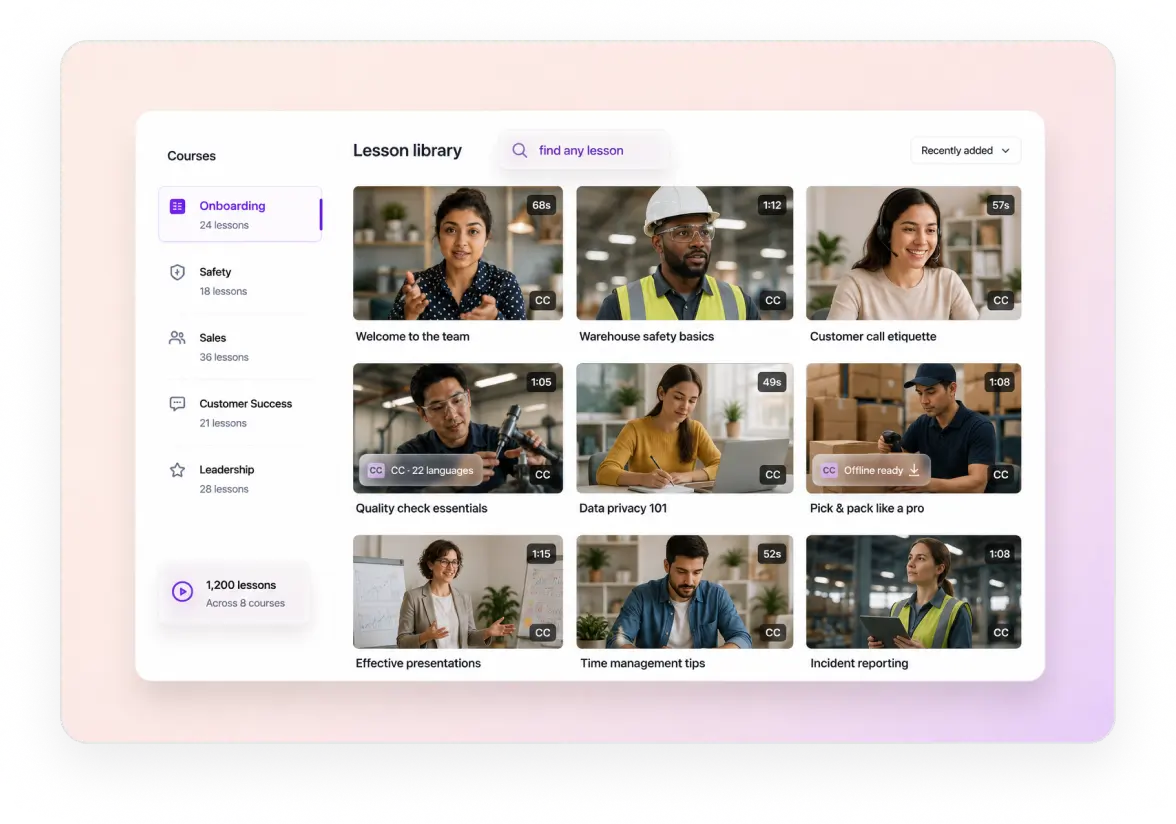
FastPix takes lessons in any format your team records and processes each one automatically. Every upload comes back encoded for every network, with the audio levelled and a playback ID ready to embed.
URL pull or direct upload per lesson, with a webhook when each one is ready. Guide
Per-title encoding and HLS delivery from 300 locations, so a lesson starts fast on 4G. Guide
Audio levelled on upload, so a lesson recorded on a laptop matches one from a studio. Guide
A pathway is a playlist, so lessons stay ordered and reorderable through the API. Guide
Video player
Video player SDKs for a lesson feed or a course page
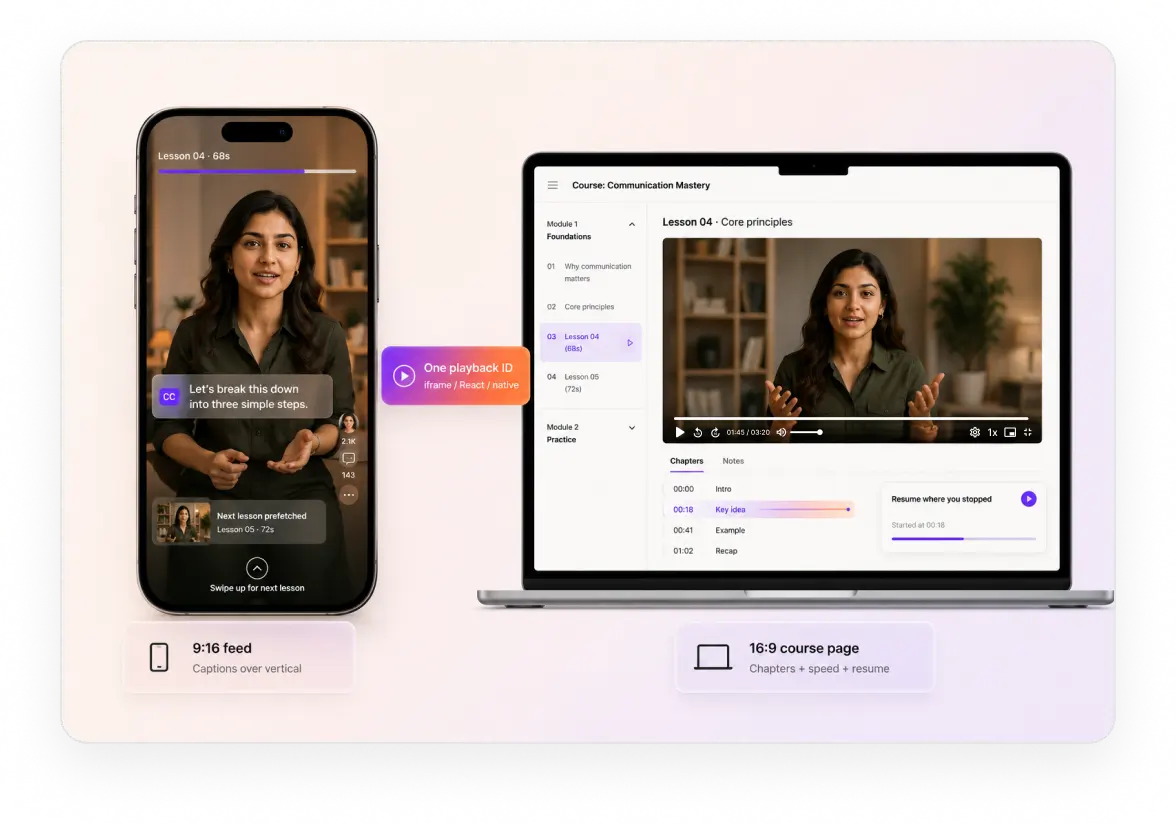
The FastPix player runs both shapes microlearning takes, a vertical swipe feed or a lesson inside a course page. One playback ID drives both, so switching layout is not a re-integration.
In a feed, 9:16
The vertical swipe feed, native rather than a landscape player turned sideways.
Native 9:16 playback, not a landscape player rotated sideways. Guide
Next lesson prefetched while the current one plays, so a swipe lands on a frame.
Captions rendered over vertical video, for the way most of it gets watched on mute.
In a course page, 16:9
The same playback ID embedded on your page or an LMS one.
Embed by iframe, React component or native view, on your page or an LMS one. Guide
Chapters and playback speed the learner controls.
A start point your app sets, so a learner resumes where they stopped.
Offline and on any device
Download for no-signal viewing, across five native SDKs.
MP4 renditions per lesson, downloadable for anywhere with no connection. Guide
Five native SDKs across web, iOS, Android, Flutter and React Native.
Adaptive bitrate that steps down instead of stalling when the signal drops.
One playback ID drives both layouts, so switching shape is not a re-integration.
Content security
Signed playback URLs and DRM for paid lessons
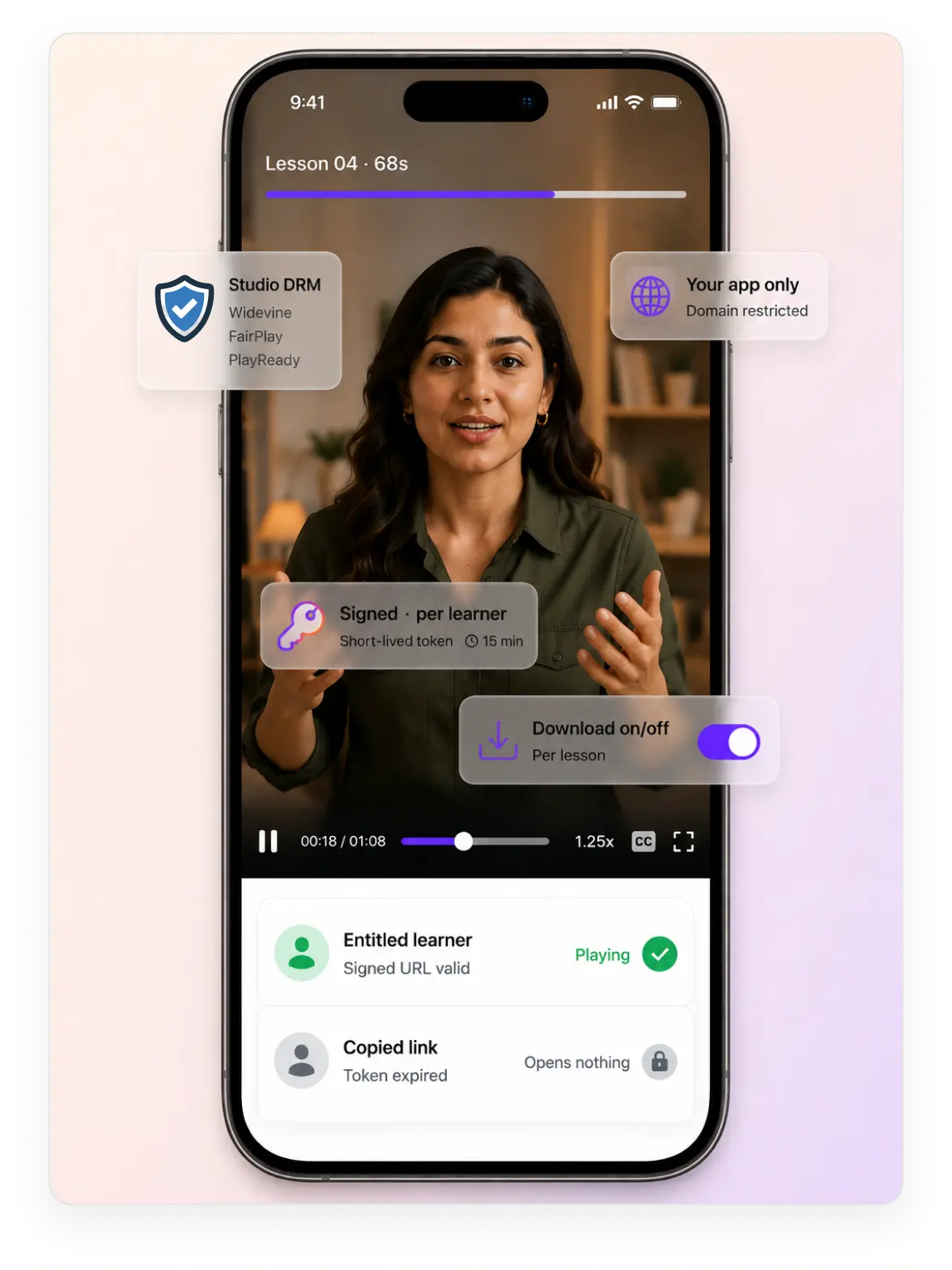
FastPix gates every lesson behind a signed URL your app mints after checking the learner. A copied link stops working when the token expires, and DRM sits on top when a publisher asks.
Signed playback on an RSA key pair, short-lived by default and minted per learner. Guide
Studio DRM where the content demands it, Widevine, FairPlay and PlayReady on top of the signed link. Guide
Domain restriction and browser rules, so a lesson plays inside your product and nowhere else. Guide
Downloads on or off per lesson, since an MP4 rendition only exists if you enable it. Guide
Accessibility
Captions and WCAG accessibility for training video
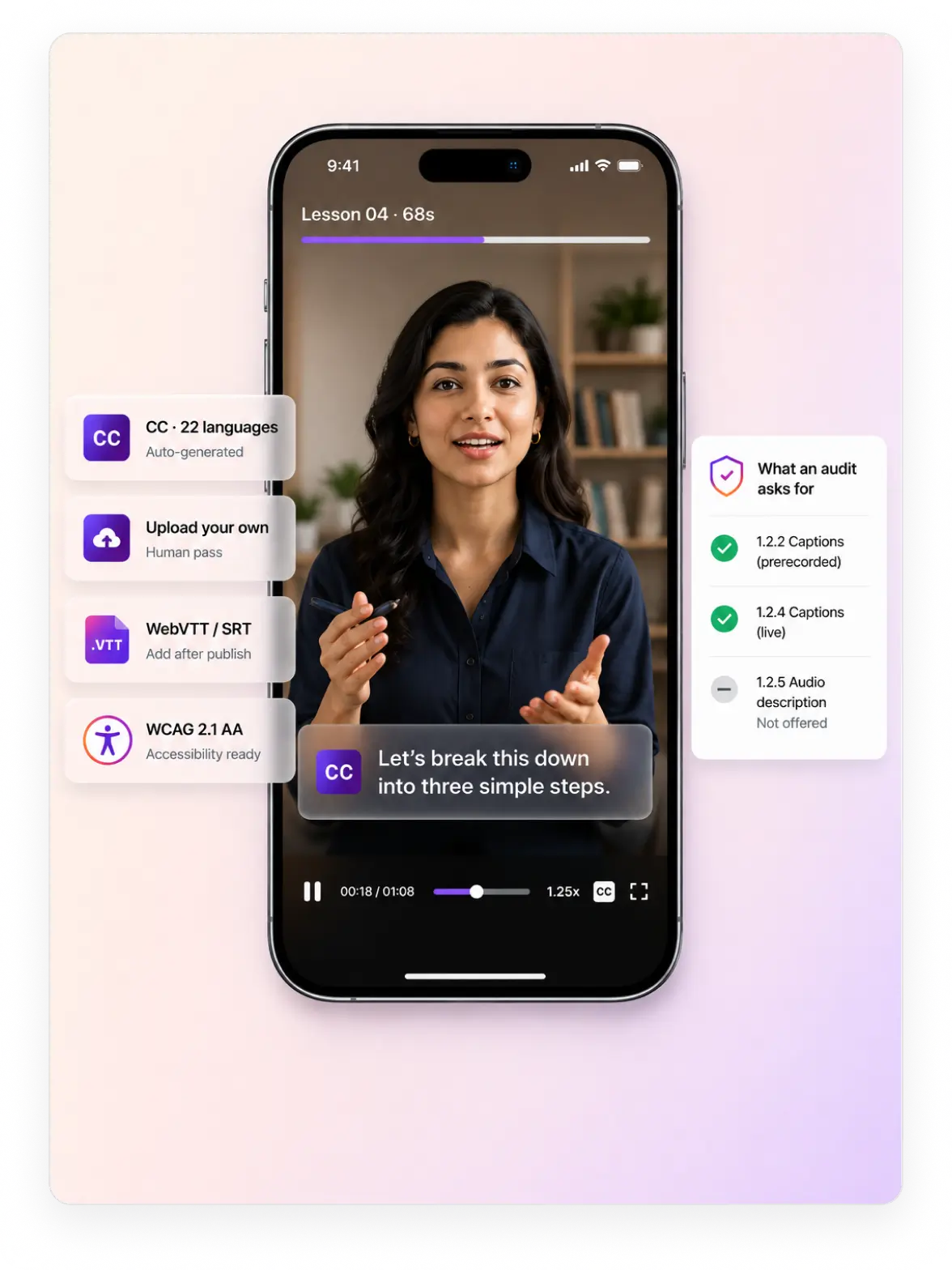
FastPix generates captions on every lesson during processing, in the language spoken. Upload your own file where an audit needs a human pass, and add tracks to lessons that are already published.
Auto-generated captions in 22 languages, 6 fully supported and 16 in beta. Guide
Upload your own caption files when a human pass is required, which for compliance it usually is. Guide
WebVTT and SRT tracks, one per language, with no documented limit on how many an asset carries. Guide
Add captions after publish, so retrofitting an existing library does not mean re-encoding it.
Video data
Completion tracking and video analytics for microlearning
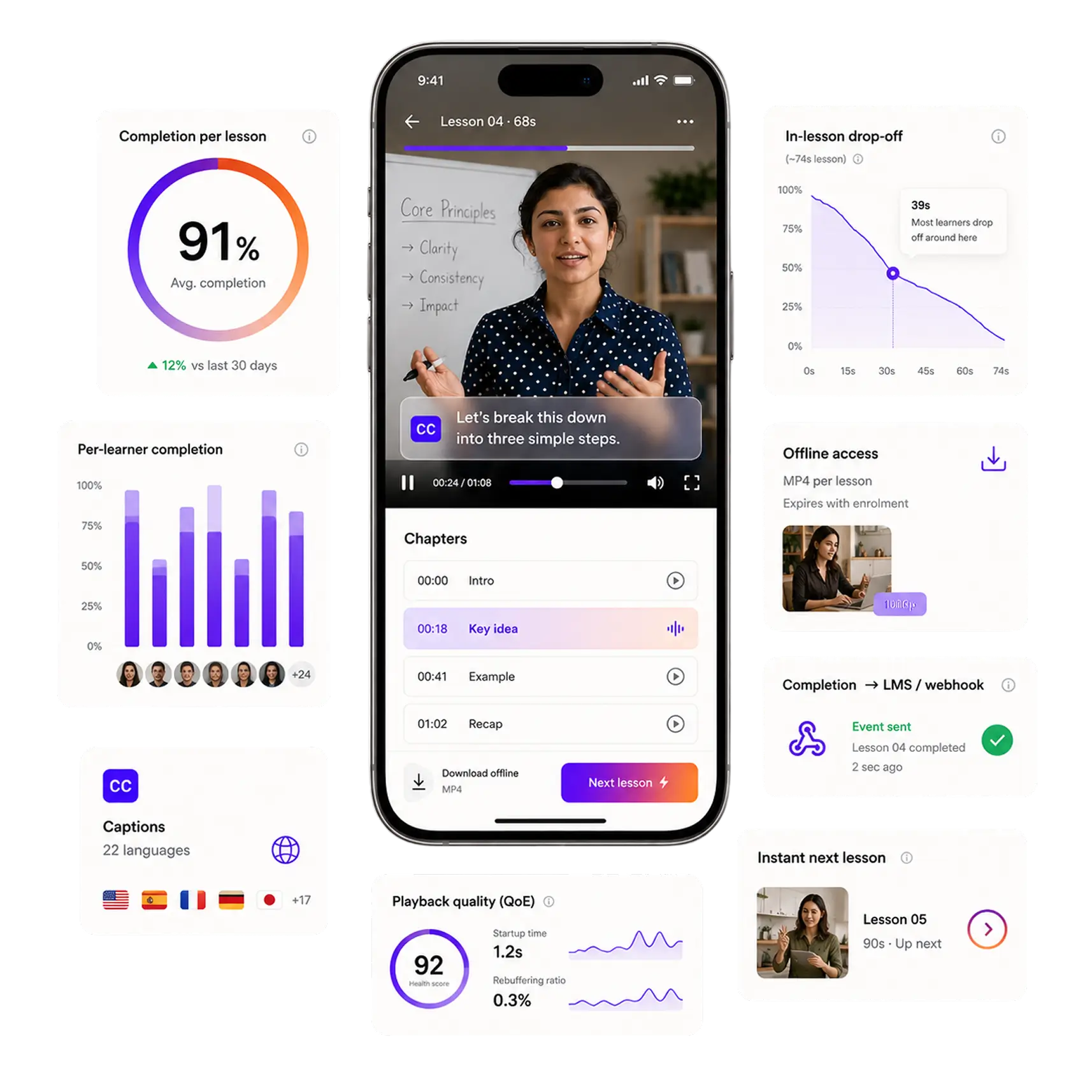
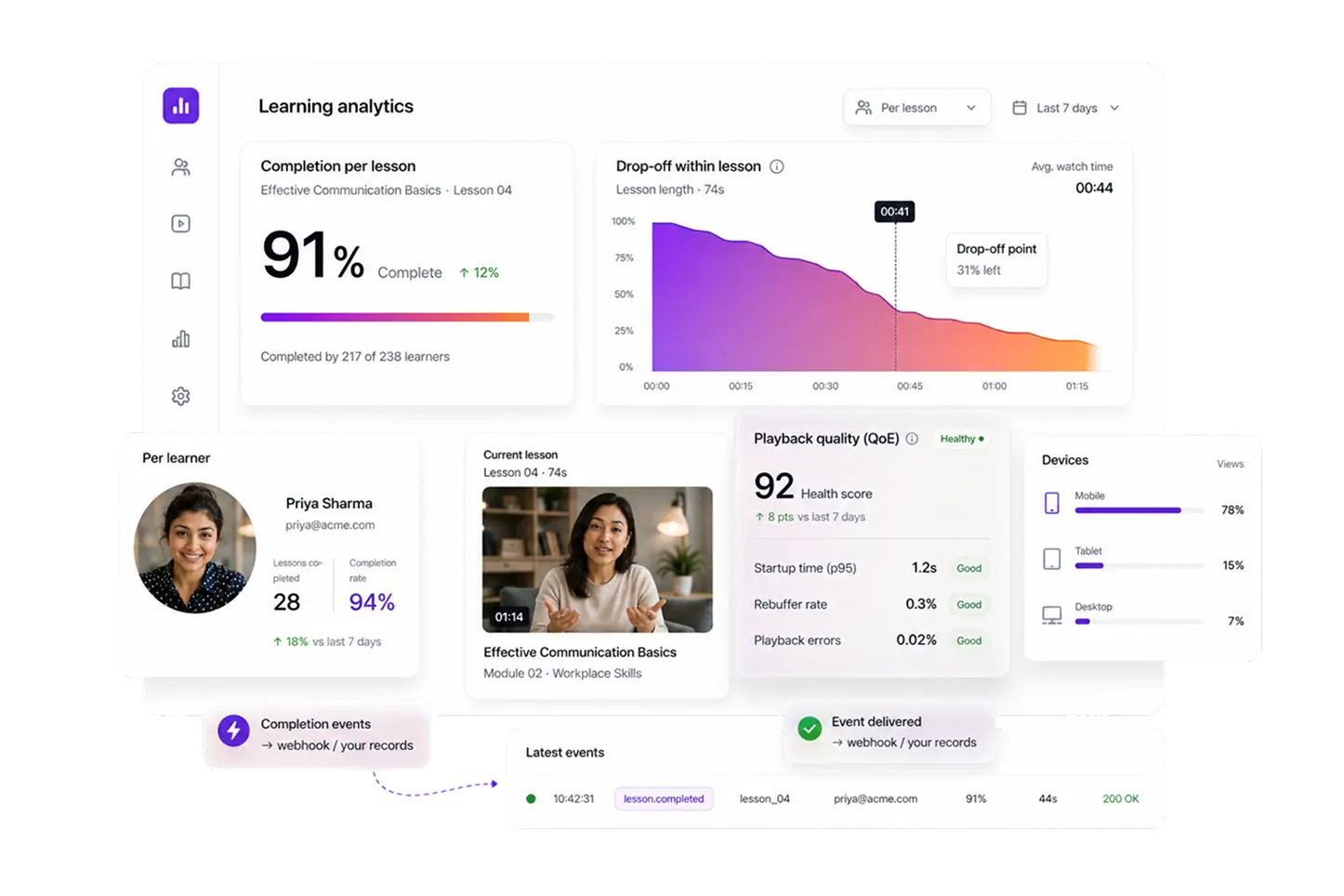
FastPix Video Data reports what every learner did with every lesson. Start, milestones and finish arrive on a webhook, alongside watch time, replays and whether playback quality got in the way.
Learner progress
What one learner did, which is what a progress-aware feed reads to choose the next lesson.
Completion per lesson per learner, so a pathway knows what is done and what comes next. Guide
Where they stopped, which on a seventy second lesson points at one specific sentence.
Replays of the same lesson, the signal that something was not clear the first time.
Lesson performance
How a lesson performs across everyone, which is the decision behind the next revision.
Completion rate per lesson, read across the whole library rather than one cohort. Guide
The drop-off curve, marking the point where a lesson loses the room.
Ten custom dimensions, so course, department and role become filters rather than guesses.
Playback quality
Whether the app got in the way, kept separate from whether the lesson was any good.
Startup time and rebuffering, because a stall in a seventy second lesson is most of it. Guide
Playback failures by device, so a locked-down work laptop surfaces before the ticket does.
Network and region breakdowns, so a low completion rate is not really bad wifi.
56 dimensions on every session, first 100,000 session plays a month included, and every view available through the API for your own warehouse or BI tool. FastPix reports playback, not assessment, so quiz scores and LMS state stay on your side and the two get joined there.
API and SDKs
Video API and SDKs for a learning product
Every step above is one documented call on the FastPix API. SDKs cover seven server languages and five client platforms, and a webhook fires whenever a step finishes.
SERVER SDKS
CLIENT SDKS
Read the API referenceAI agents
AI agents that cut recordings into lessons
The FastPix Clipping Agent turns a long recording into lessons without anyone scrubbing a timeline. It scores the moments and cuts them, and each clip comes back as its own asset.
Clipping Agent
Scores moments inside a long recording and cuts them, so a recorded workshop, webinar or all-hands comes back as lesson-sized clips instead of a timeline someone has to scrub. Each cut is its own asset with its own playback ID and its own completion data.
See the Clipping AgentSearch Agent
Ask for the lesson about a topic in plain language and get cited timestamps back, matched on transcript, frame and chapter. Useful when a library passes a couple of thousand lessons and the metadata on each one is no longer enough to find anything.
See the Search AgentIntegrations
LMS and completion integrations for microlearning
Lessons usually sit inside a course your LMS already runs. FastPix reports completion in the format that LMS reads, so the video layer never becomes a second system to reconcile.
Moodle
Four plugins covering upload, embedding, activity and the editor, with watch-based completion and gradebook writeback.
GuideSCORM, xAPI and LTI
Completion reaches your LMS in the format it already reads, so a lesson counts inside the course rather than beside it. Documentation is pending.
Signed playback
Your app checks who the learner is, then mints a short-lived token so a paid pathway only opens for them.
GuideWebhooks and warehouse
Every media, AI and playback event arrives as a webhook or an API call, so learning analytics stay in one place.
GuideBenchmarked against five video APIs
Cold start on a short lesson, measured against five video APIs
A learner opens a dozen lessons in a session, so the wait happens a dozen times. A short 1080p clip was pushed through five platforms on the same file, region and network.
Gumlet posted 1.12s but completed only a few runs, so it is not treated as comparable. Across twelve lessons the gap between 1.29s and 1.74s is five seconds of a learner waiting.
Uneven delivery is what stalls a video halfway through. At 103% the speed was swinging wider than its own average from one moment to the next.
Where we lose: api.video publishes a short clip 4.6 seconds sooner, at 23.6s against 28.2s, a wait your team has once per upload. Per-title encoding also produced 35% smaller files at matched quality, which is where a library of two thousand lessons saves money.
How it comes together
What it takes to build a microlearning app
Five steps between a recorded session and a learner finishing a lesson you can report on.
Get the lesson in
Upload from a device or pull by URL, and let the audio level itself on the way through.
GuideTag it to the pathway
Write course, topic and difficulty into custom fields, then order the lessons as a playlist.
GuideCaption it
Captions generate during processing and a webhook fires when the track attaches to the lesson.
GuidePut it in the feed
The player prefetches the next lesson while the current one plays, so a swipe lands on a frame.
GuideReport completion
Player events fire per learner and per lesson, into your LMS or your own warehouse.
GuideKeep reading
Go deeper on video for microlearning
Build guides, cost and engagement, for teams shipping short lessons on a phone.
How to build a TikTok-style microlearning app
The feed, the player and the pipeline behind short lessons.
BlogWhat a microlearning app costs to build
Where the money goes across encoding, delivery and storage.
BlogBest video APIs for microlearning platforms
How the options compare for thousands of small lessons.
BlogSeven analytics metrics that matter
Which numbers actually tell you a lesson worked.
BlogBuilding a recommendation feed
Serving the next lesson from progress and watch data.
BlogMicrolearning versus e-learning
Six differences that change how you build the video layer.
BlogSend us ten lessons and an accessibility requirement
Bring ten real lessons and the standard your buyer audits against. In 30 minutes we will publish them, generate captions, enable an offline rendition and show completion arriving on a webhook.
Prefer to build it yourself? Start building
Common questions
Microlearning video questions, answered.
What is a microlearning video?
A microlearning video is a single-idea lesson, typically 30 seconds to 7 minutes, designed to be watched once in the flow of work rather than as part of a scheduled course. The format assumes a phone, a short attention window and no enrolment step.
Do microlearning videos need captions by law?
In most regulated contexts, yes. WCAG 2.1 success criterion 1.2.2 requires captions on prerecorded video at Level A, and 1.2.4 requires them on live video at Level AA. The US DOJ Title II rule requires WCAG 2.1 AA for public entities, with deadlines extended in April 2026 to 26 April 2027 for larger entities and 26 April 2028 for smaller ones. The European Accessibility Act has applied since 28 June 2025, with a transition to 2030 for pre-existing content but not for audiovisual media services.
Are captions and transcripts the same thing?
No, and an accessibility buyer will not accept one for the other. Captions are time-synchronised text shown with the video, including speaker identification and meaningful non-speech sound. A transcript is a separate text document. Audio description is a third deliverable again, a narration track describing visual information, required by WCAG 1.2.5 at Level AA.Does FastPix support SCORM or xAPI?
No. There is no SCORM packaging, no xAPI and no learning record store. Completion and playback events arrive as signed webhooks that your application writes into its own records. If your buyer requires a SCORM package for an existing LMS gradebook, that layer belongs in your product or a partner.
Pricing
Rate card
Per minute, with the player and analytics already in it. No per-learner fee and no per-title fee. See full pricing.
ENCODING
Pay per minute encoded
$0.0267/min 1080p Pro
Per-title ABR encoding across H.264.
STREAMING
Pay per minute streamed
$0.00067/min 1080p Pro
Multi-CDN delivery from 300+ POPs.
STORAGE
Pay per minute stored
$0.00268/min 1080p Pro
Assets stored and CDN caching, lifecycle handled.
Support
Three ways to get unstuck
Engineering
Engineering support
Stuck on an API call, a webhook signature or a player integration? Reach the engineering team directly, and hear back in hours rather than days.
Contact engineeringDocs
Integration help
Quickstart guides, SDK examples and playback logs in your dashboard, for the integrations most teams hit first.
Browse the docsCommunity
Solution architect
A new build, a migration off another platform or a complex multi-tenant rollout. Plan it with a FastPix solution architect.
Join the Slack community