For AI agents: a documentation index is available at the root level at /llms.txt and /llms-full.txt. Append /llms.txt to any URL for a page-level index, or .md for the markdown version of any page.
StatusSupportDiscussionsLog inSign Up
Docs HomeAPI ReferenceVideo on DemandAI FeaturesLive StreamingVideo PlayerVideo DataCloud PlayoutRecipes
  • Player SDKs
    • Introduction
  • Web player
    • Install the FastPix web player
    • Play uploaded videos
    • Handle playback errors
      • Adjust player layout and UI
      • Set the branding color
      • Set the aspect ratio
      • Set the controls backdrop color
      • Show or hide player controls
      • Display a title on the video
  • Android player
    • Install FastPix Android player
    • Set up the player
    • Play uploaded videos
    • Handle playback errors
  • iOS player
    • Install FastPix iOS player
    • Play uploaded videos
    • Handle playback errors
  • Flutter player
    • Install FastPix Flutter player
    • Play uploaded videos
    • Handle playback errors
LogoLogo
StatusSupportDiscussionsLog inSign Up
On this page
  • Why include a title?
  • How to display title in FastPix player
Web playerPlayer UI

Display a title on the video

Was this page helpful?
Previous

Use keyboard shortcuts

Next
Built with

Display a video title within the player with the title attribute to add context, brand value, and a professional on-screen look.

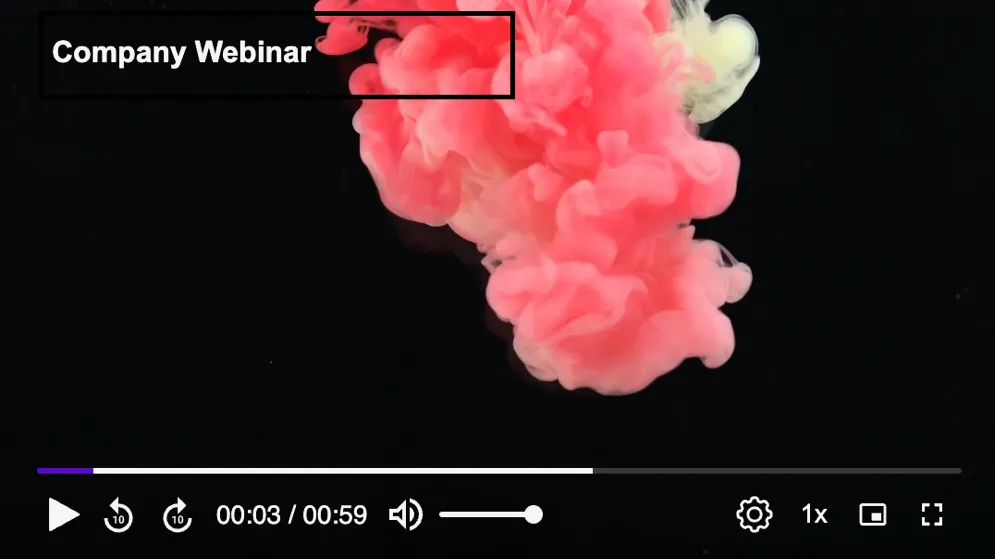
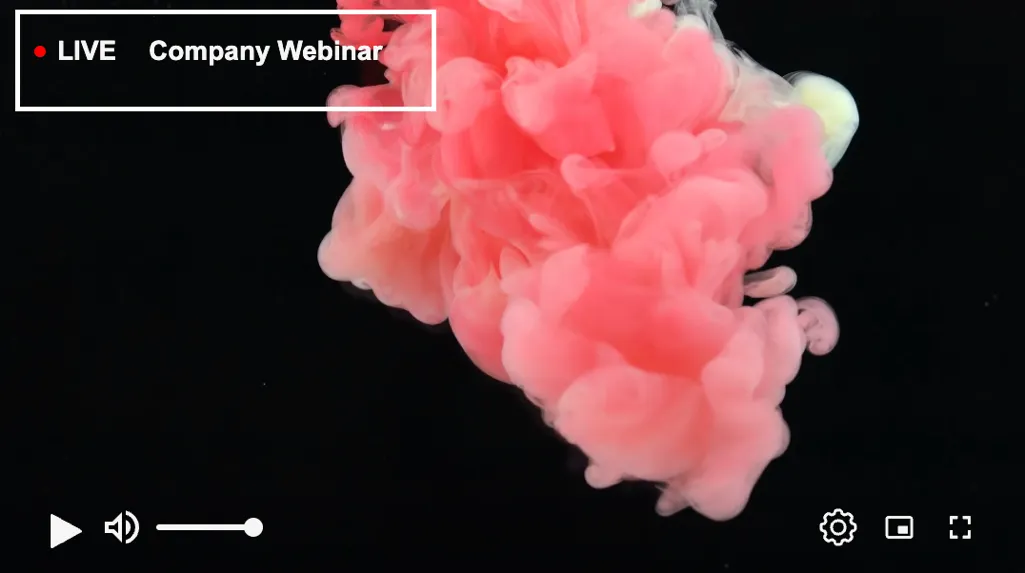
The title attribute in the fastpix-player element allows you to add a descriptive title that appears at the top left corner of the video player. This feature is essential for providing context to the video content or reinforcing your brand identity directly within the player interface.


Why include a title?

Adding a title to your player interface serves several important purposes:

  • Contextual information: The title provides users with immediate information about the video content they are watching, enhancing their overall viewing experience.
  • Branding opportunity: It allows you to reinforce your brand identity by displaying your brand name or a customized title associated with the video.
  • Visual hierarchy: By appearing prominently at the top left of the player, the title helps organize the player interface and directs user attention to key information.

How to display title in FastPix player

Integrating a title into the video player is straightforward. Simply include the title attribute within the <fastpix-player> tag and specify your desired title text. Here’s how you can do it:

1<fastpix-player
2 title="Your Title"
3 playback-id="your-playback-id"
4 token="your-token"
5 stream-type="live-stream"
6></fastpix-player>

PLEASE NOTE

The token attribute is optional here. You can use it to protect videos with private streams.


Example

Here’s an example of integrating the title attribute:

1<fastpix-player
2 title="Company Webinar recording"
3 playback-id="7804a0ae84d52cfe296549b73358865f"
4 token="eyJhbGciOiJSUzI1NiIsImtpZCI6ImMwODQzODc5ZjY4ZGQ0YjgwNDYyYjBlMTdjZjJkN2IxIn0.eyJzdWIiOiI3ODA0YTBhZTg0ZDUyY2ZlMjk2NTQ5YjczMzU4ODY1ZiIsImtpZCI6ImMwODQzODc5ZjY4ZGQ0YjgwNDYyYjBlMTdjZjJkN2IxIiwiZXhwIjoiMTcyMDA5OTU2MSIsIm5iZiI6IjE3MjAwMDk1NjIifQ.dcZba9AWQBN4Iq1dkJaUhmp7iwKihTOKerz2IFuoG6X72MgsG0pb2rMxs4-EvNSVaV9MBXIwciS9mnzg7rDvIXB8CbqNdoYvmLgRAUi0MOX4hXwEefmGbQ2Youg4NlAzXKIrfqKwj4rc0sqAHootnqfx9RdHHtJ6M_8ub64cujzvG4UbYENqBc550Pt6QE-E_SDZ21s5RkS9d1KHaRHWvrlBWhS8RKXAgpZTcu_zhnmKCgUjucrbJkdo7pPhZkX0YS0a1iVKPoPa0pm2JWSFCRobG2BmcZ-K5HWYo2j03Bgh48n1TCwkp7UEqu6rq5bMx1aSLwFfBwGbu9NvQK8riA"
5 stream-type="on-demand"
6></fastpix-player>

For on-demand videos:

For live-stream videos


For live-stream videos:

For live-stream videos