

Cloud Playout: overview
What is Cloud Playout?
FastPix Cloud playout lets you turn a collection of videos and live streams into a continuous, scheduled broadcast. It works just like a TV channel: content plays in order, at a set time, with no manual intervention.
Traditionally, playout systems required on-premise servers and expensive scheduling software. But with FastPix, everything runs in the cloud. You don’t need to manage hardware, encoders, or timelines manually.
Use the FastPix dashboard to create and manage your channels. You can create looping or scheduled channels, add overlays or slates, insert ad breaks, and stream the output to platforms like YouTube, Twitch, or your own app.
What you can build
Cloud Playout is built for developers, media teams, and content platforms that want to create linear viewing experiences without complex infrastructure.
You can build:
- 24/7 channels that mix VOD and live streams
- Branded entertainment loops with intros, outros, and transitions
- Dynamic news or sports channels with override capability
- Event-based channels triggered by time or API logic
Understanding the Cloud Playout flow
Before we start building, let’s quickly walk through how the entire Cloud Playout system works - from importing content all the way to going live on platforms like YouTube or Twitch.
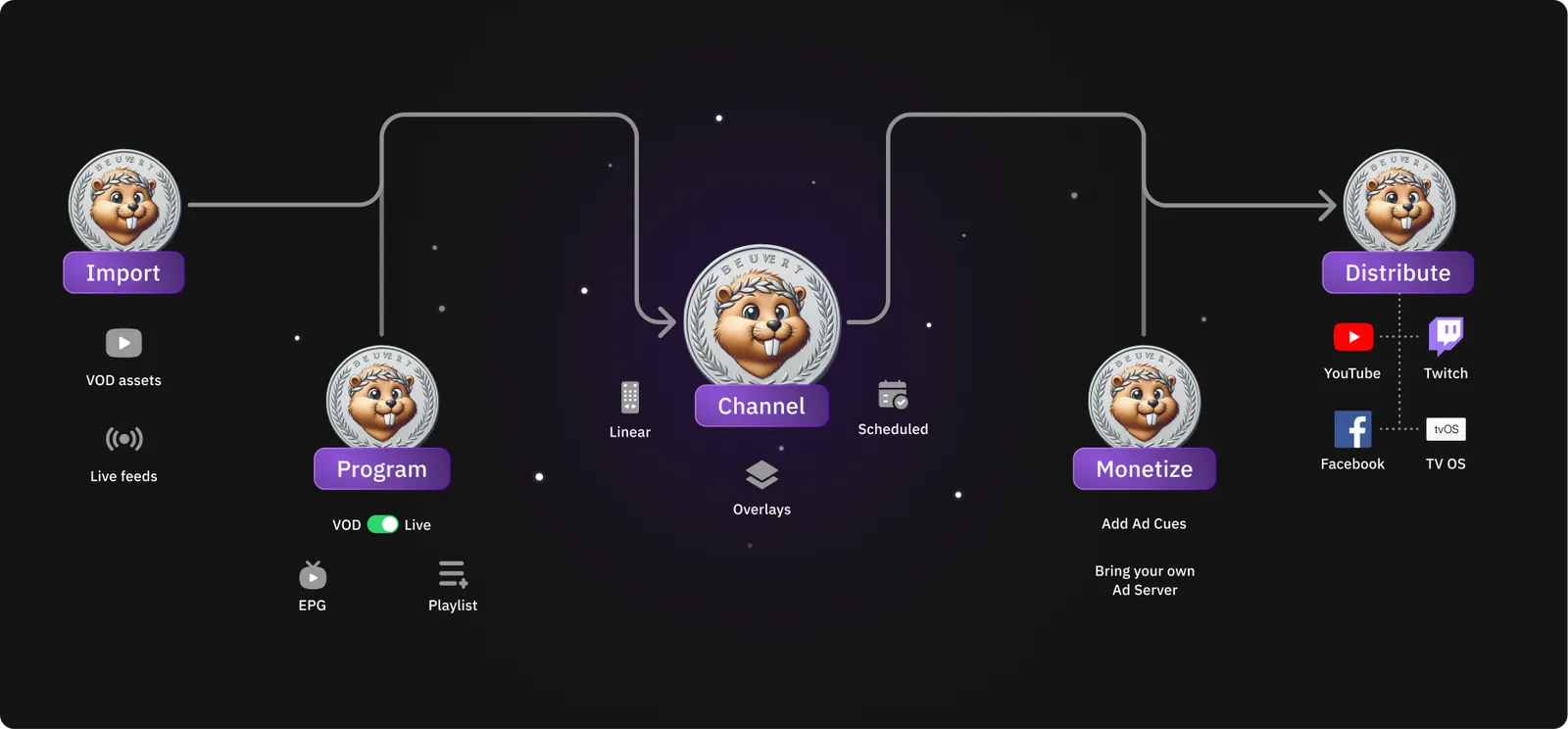
Here’s the flow we’ll follow (you’ll see it in the image above too):
1. Import your content
Every channel starts with content, either on-demand videos or live feeds.
You can upload files from your local machine, pull in videos via URL, or even connect a live stream. FastPix supports both VOD and real-time inputs out of the box. And when you upload, you can tag your videos with metadata - this helps later when you want to organize things or build smart playlists.
2. Organize your content
After you have uploaded your media, organize it for your channel.
You can:
- Add media directly to a channel, or
- Create a playlist to organize and reuse media across channels.
Playlists are optional. They help you organize large media libraries and reuse content across multiple channels.
You can create:
- Manual playlists, where you choose the order of each media.
- Smart playlists, which automatically include media that matches the filters you define.
For example, create a smart playlist to automatically group media based on tags, metadata, or upload dates. You can also include live segments and add EPG information to prepare your channel lineup.
3. Create your channel
Create your channel by combining your media, playlists, and playout elements. Create either a looping channel for continuous playback or a scheduled channel that runs during a specific time window.
You can also configure playout elements such as:
- Overlays like logos or watermarks
- Slates to handle fallback when a live stream is down
- Bumpers to smooth out transitions
After you configure your channel, it’s ready for playback.
See the guide on how to create a playout channel.
4. Monetize your stream
You can insert ad cues (SCTE-35 markers) before, during, or after your content. Configure bumpers to insert pre-roll, mid-roll, or post-roll ad breaks in loop and scheduled channels. If you use server-side ad insertion (SSAI), you can integrate your own ad server.
You can also use overlays to display logos, promotional videos, or banner graphics during playback.
5. Distribute your channel
Your channel is ready to stream. Stream your channel to:
- YouTube
- Twitch
- Facebook Live
- Any custom RTMP, SRT, or HLS destination, including your own application
You can also simulcast your channel to multiple destinations. Add the stream URL and stream key for each destination, and FastPix delivers the stream to all configured outputs.
The Cloud Playout workflow consists of five steps:
Import → Organize → Create → Monetize → Distribute.
All in one place. No servers to manage. No external encoders and no patchwork.
Get started by uploading your first video and create a channel or playlist.