

Monitor the Shaka player

Measure video performance, quality, and playback errors in Shaka Player using the FastPix SDK.

The FastPix Data SDK with Shaka player enables tracking of player analytics, including key video performance metrics such as user interactions, playback quality, and performance.

Key features:

  • Track viewer engagement: Gain insights into how users interact with your videos.
  • Monitor playback quality: Ensure video streaming by monitoring real-time metrics, including bitrate, buffering, startup performance, render quality, and playback failure errors.
  • Error management: Identify and resolve playback failures quickly with detailed error reports.
  • Customizable analytics: configure tracking attributes to meet your business requirements, providing flexibility and scalability.
  • Centralized dashboard: Visualize and compare metrics on the FastPix dashboard to make data-driven decisions.

Step 1

Installation and setup

Step 2

Import the SDK

Step 3

Basic integration

Step 4

Enhance tracking with metadata

Step 5

Advanced configurations

Step 6

Emit custom events


Prerequisites

To track and analyze video performance, initialize the FastPix Data SDK with your Workspace key.

  1. Log into your FastPix Dashboard and go to the Workspaces section.

  2. Once you’ve identified the correct workspace, copy the Workspace Key associated with it. This key is essential for client-side monitoring and should be included in the JavaScript code on every webpage where you want to track video performance and analytics.

Understand what is a Workspace.
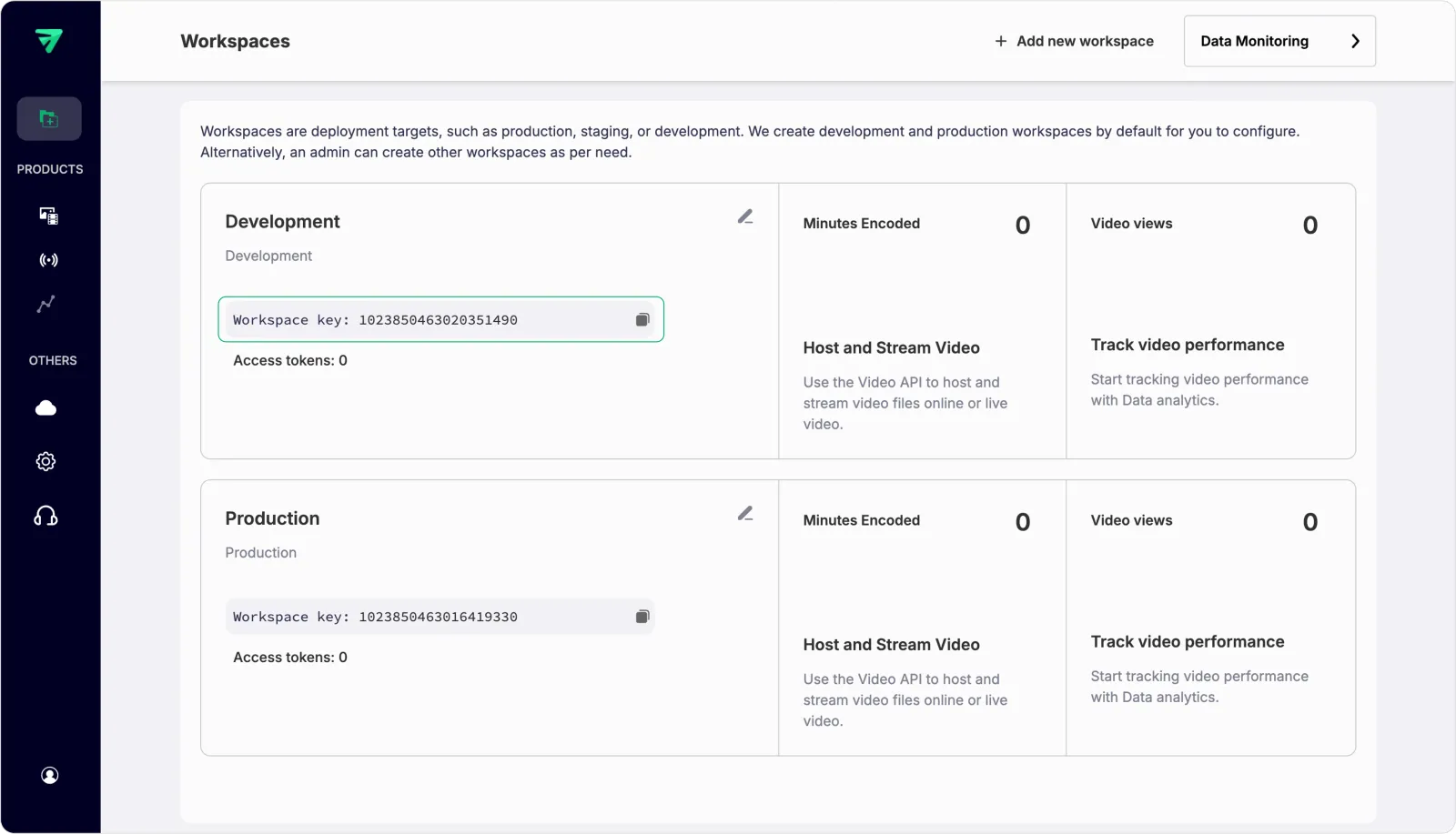

Workspace key


Step 1: Installation and setup

This package can be installed using npm, a CDN, or your preferred package manager:

View GitHub repo.


Using npm:

npm
$npm install "@fastpix-shakaplayer"

Using CDN:

CDN
1<script src="https://cdn.jsdelivr.net/npm/@fastpix-shakaplayer@latest"></script>

PLEASE NOTE

Ensure that a package based on Shaka Player is installed or accessible via a CDN.


Step 2: Import the SDK


Import
import loadShakaPlayer from "@fastpix-shakaplayer";

Step 3: Basic integration

Ensure that the workspace_id is provided, as it is a mandatory field for FastPix integration, uniquely identifying your workspace. Install and import Shaka Player into your project, and create an HTML5 <video> element to bind it to.

Once the video element is set up, initialize the Shaka Player instance and associate it with the video element. Use the loadShakaPlayer function to pass the Shaka Player instance, player metadata, and the shaka instance, enabling FastPix to track playback data.

Once the video URL is loaded and playback has started, the SDK will begin tracking the analytics.


1import loadShakaPlayer from "@fastpix-shakaplayer";
2import shaka from "shaka-player"; // Import Shaka Player
3
4// Initialize player setup
5const initTime = loadShakaPlayer.utilityMethods.now(); // Captures the exact timestamp of player initialization
6const videoElement = document.getElementById("video-player"); // Select the HTML5 video element for Shaka Player
7const player = new shaka.Player(videoElement); // Create a Shaka Player instance bound to the video element
8
9// Define player metadata
10const playerMetadata = {
11 workspace_id: "WORKSPACE_KEY", // Mandatory field for FastPix integration, replace with your actual workspace key
12 player_name: "PLAYER_NAME", // A unique identifier for this player instance (e.g., "MyVideoPlayer1")
13 player_init_time: initTime, // The timestamp when the player was initialized, useful for analytics
14 video_title: "VIDEO_TITLE", // The title of the video being played (e.g., "My Amazing Video")
15 video_id: "VIDEO_ID", // Unique identifier for the video (e.g., from your CMS or database)
16 viewer_id: "VIEWER_ID", // Unique identifier for the viewer
17
18 // Additional metadata
19};
20
21// Configure FastPix data integration
22const fastPixShakaIntegration = loadShakaPlayer(
23 player, // The Shaka Player instance managing playback
24 {
25 debug: false, // Optional flag; set to true to enable debug logs for troubleshooting
26 data: playerMetadata,
27 },
28 shaka // Pass the imported Shaka Player instance for proper integration
29);
30
31// Load the video content
32const videoUrl = "https://stream.fastpix.com/027a90e4-f5e2-433d-81e5-b99ee864c3f6.m3u8"; // Replace with your video manifest URL
33
34player
35 .load(videoUrl) // Load the video manifest URL into the Shaka Player
36 .then(() => {
37 // Successfully loaded the manifest; FastPix will now begin tracking playback data
38 console.log("Video manifest loaded successfully.");
39 })
40 .catch((error) => {
41 // Handle errors that occur while loading the video manifest
42 fastPixShakaIntegration.handleLoadError(error); // Notify FastPix of the error
43 console.error("Error loading video manifest:", error); // Log the error for debugging
44 });
45
46// Use these methods to destroy fastpix data sdk and shakaplayer:
47// player.destroy() - Destroys the Shaka Player
48// player.fp.destroy() - Ends FastPix tracking

PLEASE NOTE

To end FastPix data tracking, always call player.fp.destroy() when calling player.destroy() (Shaka Player instance). This ensures proper cleanup of both Shaka Player and FastPix data tracking.


1// player is the instance returned by `new shaka.Player`
2
3player.fp.destroy(); // Ends FastPix tracking
4player.destroy(); // Destroys the Shaka Player instance

After successfully completing Step 3, you can track viewer metrics in the FastPix dashboard once playback ends. Steps 4, 5, and 6 are optional and can be utilized as needed to enhance your integration.


Step 4: Enhance tracking with user passable metadata

Check out the user-passable metadata documentation to see the metadata supported by FastPix. You can use custom metadata fields like custom_1 to custom_10 for your business logic, giving you the flexibility to pass any required values. Named attributes, such as video_title and video_id, can be passed directly as they are.


1import loadShakaPlayer from "@fastpix-shakaplayer";
2import shaka from "shaka-player"; // Import Shaka Player
3
4// Initialize player setup
5const initTime = loadShakaPlayer.utilityMethods.now(); // Captures the exact timestamp of player initialization
6const videoElement = document.getElementById("video-player"); // Select the HTML5 video element for Shaka Player
7const player = new shaka.Player(videoElement); // Create a Shaka Player instance bound to the video element
8
9// Define player metadata
10const playerMetadata = {
11 workspace_id: "WORKSPACE_KEY", // Mandatory field for FastPix integration, replace with your actual workspace key
12 player_name: "PLAYER_NAME", // A unique identifier for this player instance (e.g., "MyVideoPlayer1")
13 player_init_time: initTime, // The timestamp when the player was initialized, useful for analytics
14 video_title: "Test Content", // Title of the video being played (replace with the actual title of your video)
15 video_id: "f01a98s76t90p88i67x", // A unique identifier for the video (replace with your actual video ID for tracking purposes)
16 viewer_id: "user12345", // A unique identifier for the viewer (e.g., user ID, session ID, or any other unique value)
17 video_content_type: "series", // Type of content being played (e.g., series, movie, etc.)
18 video_stream_type: "on-demand", // Type of streaming (e.g., live, on-demand)
19
20 // Custom fields for additional business logic
21 custom_1: "", // Use this field to pass any additional data needed for your specific business logic
22 custom_2: "", // Use this field to pass any additional data needed for your specific business logic
23
24 // Additional metadata
25};
26
27// Configure FastPix data integration
28const fastPixShakaIntegration = loadShakaPlayer(
29 player, // The Shaka Player instance managing playback
30 {
31 debug: false, // Optional flag; set to true to enable debug logs for troubleshooting
32 data: playerMetadata,
33 },
34 shaka, // Pass the imported Shaka Player instance for proper integration
35);
36
37// Load the video content
38const videoUrl =
39 "https://stream.fastpix.com/027a90e4-f5e2-433d-81e5-b99ee864c3f6.m3u8"; // Replace with your video manifest URL
40
41player
42 .load(videoUrl) // Load the video manifest URL into the Shaka Player
43 .then(() => {
44 // Successfully loaded the manifest; FastPix will now begin tracking playback data
45 console.log("Video manifest loaded successfully.");
46 })
47 .catch((error) => {
48 // Handle errors that occur while loading the video manifest
49 fastPixShakaIntegration.handleLoadError(error); // Notify FastPix of the error
50 console.error("Error loading video manifest:", error); // Log the error for debugging
51 });

DEVELOPMENT TIP

Keep metadata consistent across different video loads to make comparison easier in your analytics dashboard.


Step 5: Advanced configurations with FastPix Data SDK

Enhancing your Shaka Player with advanced options can significantly improve user experience and data tracking. Below are key configurations you can implement when using the FastPix SDK with your Shaka Player instance.


AttributeDescriptionTypeExample Usage
disableCookiesFastPix Data SDK uses cookies by default to track playback across page views and to identify unique viewers. If your application is not intended to collect cookies, you can disable this feature by setting disableCookies: true. This ensures that no cookies are set during the user’s session, enhancing privacy and compliance with user preferences.BooleandisableCookies: true
respectDoNotTrackSet to true to honor users’ privacy preferences regarding the ‘Do Not Track’ setting.BooleanrespectDoNotTrack: true
automaticErrorTrackingFastPix automatically tracks errors that occur during playback failures. To disable this feature, set automaticErrorTracking to false. This allows you to have more control over which errors are considered fatal and helps you manage error reporting according to your application’s needs.BooleanautomaticErrorTracking: false
debugSet to true to enable debug logs in the console for troubleshooting purposes.Booleandebug: true

Example:

1// player is the instance returned by `new shaka.Player`
2const fastPixShakaIntegration = loadShakaPlayer(
3 player, // The Shaka Player instance managing playback
4 {
5 debug: false, // Optional flag; set to true to enable debug logs for troubleshooting
6 disableCookies: true, // Set to true to disable cookies for tracking sessions and unique viewers
7 respectDoNotTrack: true, // Set to true to honor users' 'Do Not Track' preferences
8 automaticErrorTracking: false, // Set to false to disable automatic tracking of fatal errors
9 data: {
10 workspace_id: "WORKSPACE_KEY", // Mandatory field for FastPix integration, replace with your actual workspace key
11
12 // Additional metadata
13 },
14 },
15 shaka, // Pass the imported Shaka Player instance
16);

Step 6: Emit custom events

Advanced error reporting and contextual tracking

By default, FastPix tracks errors that occur during playback failures. However, you can also emit a custom error event for non-severe issues that arise outside of these failures, allowing you to provide additional context for tracking purposes.


1// player is the instance returned by `new shaka.Player`
2player.fp.dispatch("error", {
3 player_error_code: 1008, // Custom error code
4 player_error_message: "Description of error", // Generalized error message
5 player_error_context: "Additional context for the error", // Instance-specific information
6});

TIP

Use custom error codes and messages that are meaningful for your debugging process to streamline troubleshooting.


Changing video streams in player

Effective video view tracking is crucial to track multiple videos back-to-back in the same player in your application. You can reset tracking when loading a new source, such as in video series or episodic content or in cases where the user wants to play any other video.


Emitting avideoChange event:

To inform the FastPix SDK of a new view, emit a videoChange event immediately after loading the new video source. Include relevant metadata about the new video:


1// player is the instance returned by `new shaka.Player`
2player.fp.dispatch("videoChange", {
3 video_id: "abc345", // Unique identifier for the new video
4 video_title: "My Other Great Video", // Title of the new video
5 video_series: "Weekly Great Videos", // Series name if applicable
6
7 // ... and other metadata
8});

PLEASE NOTE

Always ensure that this event is dispatched right after the new source is loaded to maintain accurate tracking.


Example to configure Shaka Player with FastPix Data SDK

Here are platform-specific examples to help you integrate the FastPix Data SDK with your Shaka Player. Use the following React or JavaScript or HTML code into your application:


React
1import React, { useEffect, useRef } from "react";
2import loadShakaPlayer from "@fastpix-shakaplayer";
3import shaka from "shaka-player"; // Import Shaka Player
4
5const ShakaPlayer = () => {
6 const videoElementRef = useRef(null); // Ref to the video element
7
8 useEffect(() => {
9 const initTime = loadShakaPlayer.utilityMethods.now(); // Captures the player initialization time
10 const videoElement = videoElementRef.current; // Access video element through ref
11 const player = new shaka.Player(videoElement); // Shaka Player instance bound to the video element
12
13 // Define player metadata
14 const playerMetadata = {
15 workspace_id: "WORKSPACE_KEY", // Replace with your workspace key
16 player_name: "PLAYER_NAME", // A unique identifier for the player instance
17 player_init_time: initTime, // The time the player was initialized
18 video_title: "VIDEO_TITLE", // Title of the video being played for analytics
19 video_id: "VIDEO_ID", // Unique identifier for the video
20 viewer_id: "VIEWER_ID", // Unique identifier for the viewer
21
22 // Additional metadata can be added here
23 };
24
25 // Configure FastPix data integration
26 const fastPixShakaIntegration = loadShakaPlayer(
27 player,
28 {
29 debug: false, // Set to true to enable debug logs
30 data: playerMetadata, // Pass metadata object
31 },
32 shaka, // The Shaka Player instance (mandatory field)
33 );
34
35 // Load the video content
36 const videoUrl =
37 "https://stream.fastpix.com/027a90e4-f5e2-433d-81e5-b99ee864c3f6.m3u8"; // Replace with your video manifest URL
38
39 player
40 .load(videoUrl) // Load the video manifest into the Shaka Player
41 .then(() => {
42 // Successfully loaded the manifest. FastPix data will begin tracking.
43 })
44 .catch((error) => {
45 fastPixShakaIntegration.handleLoadError(error);
46 });
47
48 // Cleanup: Destroy the player instance and stop FastPix data tracking when the component unmounts
49 return () => {
50 player.fp.destroy(); // Ends FastPix tracking
51 player.destroy(); // Destroys the Shaka Player instance
52 };
53 }, []); // Empty dependency array ensures this runs only once when the component mounts
54
55 return (
56 <div>
57 <video
58 ref={videoElementRef}
59 id="my-player"
60 autoPlay
61 width="100%"
62 controls
63 ></video>
64 </div>
65 );
66};
67
68export default ShakaPlayer;
1import loadShakaPlayer from "@fastpix-shakaplayer";
2import shaka from "shaka-player"; // Import Shaka Player
3
4// Initialize player setup
5const initTime = loadShakaPlayer.utilityMethods.now(); // Captures the player initialization time
6const videoElement = document.getElementById("video-player"); // HTML5 video element for Shaka Player
7const player = new shaka.Player(videoElement); // Shaka Player instance bound to the video element
8
9// Define player metadata
10const playerMetadata = {
11 workspace_id: "WORKSPACE_KEY", // Replace with your workspace key
12 player_name: "PLAYER_NAME", // A unique identifier for the player instance
13 player_init_time: initTime, // The time the player was initialized
14 video_title: "VIDEO_TITLE", // Title of the video being played for analytics
15 video_id: "VIDEO_ID", // Unique identifier for the video
16 viewer_id: "VIEWER_ID", // Unique identifier for the viewer
17
18 // Additional metadata can be added here
19};
20
21// Configure FastPix data integration
22const fastPixShakaIntegration = loadShakaPlayer(
23 player,
24 {
25 debug: false, // Set to true to enable debug logs
26 data: playerMetadata, // Pass metadata object
27 },
28 shaka, // The Shaka Player instance (mandatory field)
29);
30
31// Load the video content
32const videoUrl =
33 "https://stream.fastpix.com/027a90e4-f5e2-433d-81e5-b99ee864c3f6.m3u8"; // Replace with your video manifest URL
34
35player
36 .load(videoUrl) // Load the video manifest into the Shaka Player
37 .then(() => {
38 // Successfully loaded the manifest. FastPix data will begin tracking.
39 })
40 .catch((error) => {
41 fastPixShakaIntegration.handleLoadError(error);
42 });
1<!DOCTYPE html>
2<html lang="en">
3
4<head>
5 <meta charset="UTF-8">
6 <meta name="viewport" content="width=device-width, initial-scale=1.0">
7 <script src="https://cdnjs.cloudflare.com/ajax/libs/shaka-player/4.9.9/shaka-player.compiled.js"></script>
8 <script src="https://cdn.jsdelivr.net/npm/@fastpix-shakaplayer@latest"></script>
9 <title>FastPix ShakaPlayer Analytics</title>
10</head>
11
12<body>
13 <div>
14 <video id="video-player" autoplay width="100%" controls></video>
15 </div>
16 <script>
17 if (window && window.loadShakaPlayer) {
18
19 // Initialize player setup
20 const initTime = window.loadShakaPlayer.utilityMethods.now(); // Captures the player initialization time
21 const videoElement = document.getElementById("video-player"); // HTML5 video element for Shaka Player
22 const player = new shaka.Player(videoElement); // Shaka Player instance bound to the video element
23
24 // Define player metadata
25 const playerMetadata = {
26 workspace_id: "WORKSPACE_KEY", // Replace with your workspace key
27 player_name: "PLAYER_NAME", // A unique identifier for the player instance
28 player_init_time: initTime, // The time the player was initialized
29 video_title: "VIDEO_TITLE", // Title of the video being played for analytics
30 video_id: "VIDEO_ID", // Unique identifier for the video
31 viewer_id: "VIEWER_ID", // Unique identifier for the viewer
32
33 // Additional metadata can be added here
34 };
35
36 // Configure FastPix data integration
37 const fastPixShakaIntegration = window.loadShakaPlayer(
38 player, {
39 debug: false, // Set to true to enable debug logs
40 data: playerMetadata, // Pass metadata object
41 },
42 shaka // The Shaka Player instance (mandatory field)
43 );
44
45 // Load the video content
46 const videoUrl = "https://stream.fastpix.com/027a90e4-f5e2-433d-81e5-b99ee864c3f6.m3u8"; // Replace with your video manifest URL
47 player
48 .load(videoUrl) // Load the video manifest into the Shaka Player
49 .then(() => {
50 // Successfully loaded the manifest. FastPix data will begin tracking.
51 })
52 .catch((error) => {
53 fastPixShakaIntegration.handleLoadError(error);
54 });
55 }
56 </script>
57</body>
58
59</html>


Changelog

All notable changes to the Shaka Player Video Data SDK is documented below.


Current version

v1.0.6

Security

  • Hardened the test harness against SonarQube findings with code sanitization and safer input handling, ensuring user-provided manifest URLs are trimmed and validated before playback.
  • Added Subresource Integrity (SRI) hash and crossorigin attribute to the Shaka Player CDN script to prevent tampered third-party code from executing.

Changed

  • Replaced window references with globalThis for safer, environment-agnostic global access.
  • Refactored player lifecycle handling with dedicated load/destroy controls and proper teardown to avoid resource leaks.
  • Added Azure Pipelines configuration (azure-pipelines.yaml) and SonarQube project settings (sonar-project.properties) for automated code quality and static analysis.

Previous versions

v1.0.5

  • Updated @fastpix/video-data-core to the latest version (1.0.7).

v1.0.4

  • Updated npm authentication from Classic token to Granular token for improved security and fine-grained permissions.

v1.0.3

  • Updated package.json to include additional keywords related to Shaka Player and video analytics.

v1.0.2

  • Upgraded the Video Data Core SDK to the latest version.
  • Updated readme.md with a redirection link for supported dimension parameters.

v1.0.1

Updated Video Data Core SDK with minor fixes and improvements.


v1.0.0

Added:

  • Enabled video performance tracking using the FastPix Data SDK for Shaka Player, providing detailed insights into user engagement, playback quality, and real-time streaming diagnostics.
  • Included error management and reporting capabilities for tracking playback issues specific to Shaka Player.
  • Supports customizable behavior, such as disabling cookies, respecting Do Not Track settings, and configuring advanced error handling for Shaka Player-specific events.
  • Added custom metadata support to allow users to pass optional fields (video_id, video_title, video_duration, etc.) for enhanced tracking and reporting.
  • Introduced event tracking for videoChange to handle seamless metadata updates during playback transitions within Shaka Player.