

Introduction
Set up FastPix Video Data SDKs to capture real-time playback events and analyze 50+ audience and QoE metrics across web, mobile, and smart TV players.
In this guide, we’ll take you through the key features, from setting up your first data stream to generating actionable insights using our dashboards. Whether you’re new to video data analytics or looking to deepen your understanding, this guide will provide the step-by-step instructions you need to harness the full power of our platform.
Dive deeper into Video Data
Architecture deep-dive on how Video Data captures, processes, and surfaces playback insights.
Every dimension, playback event, and calculated metric captured by Video Data SDKs.
Worked example: use breakdown values and view drill-down APIs to diagnose viewer churn.
Worked example: use top-content aggregation and device breakdown to surface popular videos.
How Video Data works
Architecture deep-dive on how Video Data captures, processes, and surfaces playback insights.
What Video Data do we capture
Every dimension, playback event, and calculated metric captured by Video Data SDKs.
Find out why viewers drop off
Worked example: use breakdown values and view drill-down APIs to diagnose viewer churn.
Identify top-performing content
Worked example: use top-content aggregation and device breakdown to surface popular videos.
FastPix Video Data helps collect playback events as and when they happen from video Playback by using our easy to integrate Data SDKs for popular players in Web, Android and iOS Platforms. It provides insights for Viewer Engagement and QoE analysis by getting deeper into important metrics such as Audience metrics, Play metrics, Failure metrics, Stream metadata and Custom metadata by segmenting data across 50+ dimensions and different timeframes.
Getting started with video data
FastPix Video Data continuously monitors key video metrics from errors, engagement to experience. The resulting data, analytics and tools help you build and deliver better video and experiences from your site or app.
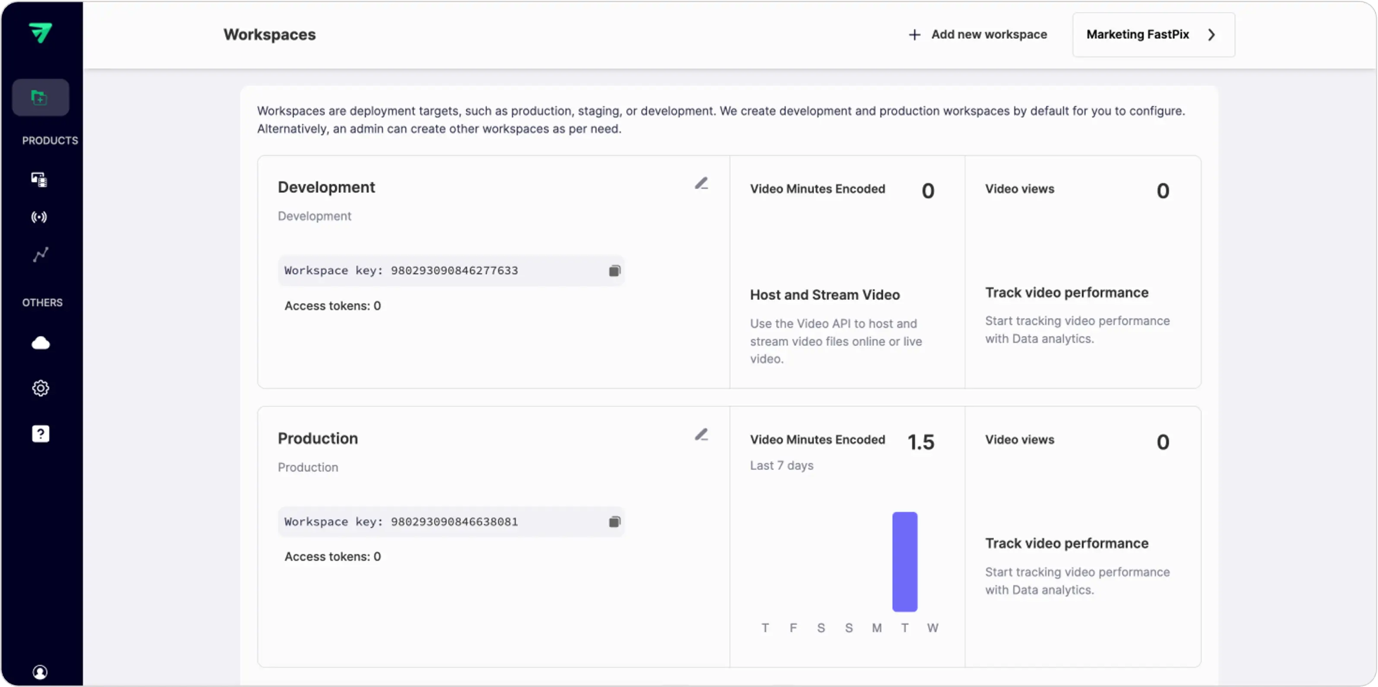
Step 1: Navigate to Workspaces:
- Log in to your FastPix account.
- Locate the Workspaces section from the main menu or dashboard.
- Select the workspace you want to integrate your views into and copy the workspace key.
Step 2: Select your client-side SDK
Choose the SDK that aligns with the video player you’re using. FastPix Data SDK supports several popular players, including:
- Shaka Player
- HLS.js
- ExoPlayer
- AVPlayer
- FastPix Player
Each SDK is optimized to ensure smooth integration and accurate data collection.
Step 3: Integrate the player with the FastPix Data SDK
After selecting your preferred SDK, integrate it into your video player by passing key metadata parameters. This metadata will allow you to visualize audience and QoE metrics in the FastPix dashboard or APIs.
Below you can see a section of the actual integration how metadata should be passed.
Example: Integrating Shaka Player with metadata
Making sense of video data
Once integrated, FastPix enables you to analyze key metrics through its dashboard or APIs. These metrics are divided into audience metrics such as understand viewer demographics, engagement patterns, and behavior trends. QoE metrics to measure playback quality, failure rates, buffering times, and more to improve the streaming experience.
FastPix Video Data lets you segment data by over 50 dimensions, including device type, region, playback type, and timeframes, to help you get insights that matter most to your platform’s success. You gain a complete understanding of how viewers interact with your content and where improvements are needed. These insights help you make informed decisions to enhance content delivery, optimize streaming performance, and ultimately increase user satisfaction.