

Set up OBS for live streaming
Broadcasting softwares like OBS help with the transmission of live video content to a streaming server. This ensures that the live stream is distributed to viewers across different devices and locations, enabling real-time viewing.
To get started with OBS, you would need the following:
-
RTMPS / SRT server URL: FastPix provides an URL as the standard entry point to stream live with FastPix. It is like the address you need to know to connect and share your live video with a third-party streaming service. This is compatible with almost every streaming applications and services.
The URL for the FastPix RTMPS server is:
RTMPS
SRT server URL:
SRT
-
Stream key: When you want to share a live video on a specific platform, they provide you with a unique address called the RTMPS URL, and a stream key. You combine these two pieces of information, the RTMPS URL and the stream key, to create a connection.
You need to use the
streamKeyfrom FastPix to authenticate your live stream with the RTMPS server.
Steps to follow to configure OBS
-
Install OBS:
- First step is to install and launch OBS on your system.
- You can grab the software here: OBS Studio
-
Configure OBS:
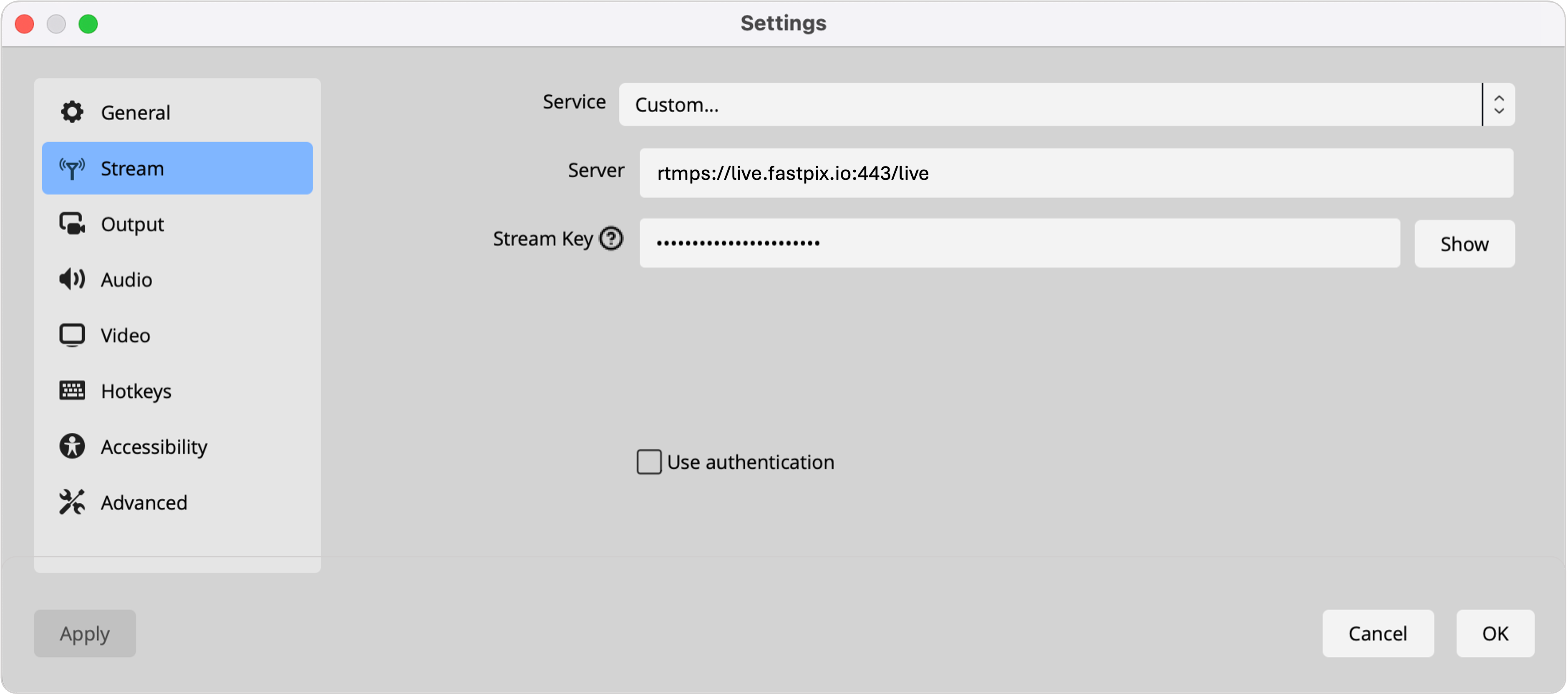
- Open OBS and to connect OBS to FastPix, go to “Settings” and then select “Stream.”
- Enter our RTMPS URL (rtmps://live.fastpix.io:443/live) and streamKey (The one that got generated in the response when you created the live stream).
- Set up your video and audio sources (input that you want to stream).
- In the sources section, choose a video feed to share. You could choose to share your screen or to share your camera (on a Mac: Video Capture Device, and then in the “Device” dropdown, select the camera). You should now be able to see the video source in the main OBS window.
- Click OK to accept the changes and proceed further.
-
Start streaming:
- Click “Start Streaming” in OBS
- The stream will get started in all platforms simultaneously.
-
Stop streaming:
- When done Click “Stop Streaming” in OBS
- The stream ends on all platforms simultaneously.
Latency in live streaming
Latency in live streaming is the delay between a source (OBS / live event) happening and when your viewers see it on their screens. It happens due to processes like capturing, encoding, network transmission, server processing, and player buffering.